8 Best Borescopes for HVAC Checks (October 2026)
The best HVAC inspection borescopes include the Ralcam 360 Articulating Borescope for narrow duct openings, the DXZtoz Dual-Lens Articulating Borescope for sidewall viewing, and the Teslong USB-C Two-Way Articulating Borescope for phone-based inspections.
On this page (11 sections)
- How we chose the best borescope for HVAC checks
- What makes a borescope useful for HVAC checks?
- Which borescope control and camera view do you need?
- Which screen and recording setup fits HVAC work?
- How should you set up a borescope for an HVAC check?
- What care and use tips help protect an inspection camera?
- Which borescope is right for your HVAC check?
- How should you choose a borescope for HVAC ducts?
- What common borescope mistakes should you avoid?
- What safety checks matter before inserting a scope?
- Which best borescope for HVAC checks should you choose?
The Ralcam 360 Articulating Borescope, 6.2 mm is the best borescope for HVAC checks overall when you need a slim probe, four-way steering and a screen built into the tool. Pick DXZtoz for front and side views, or Teslong USB-C if you prefer using a compatible phone.
An inspection camera can help you view a duct, wall cavity or equipment space without opening a large section. The right fit depends on the access opening, the turns you need to make and how you want to view and save the image.
For step-by-step guidance, see how to use a borescope for HVAC checks. If your inspection extends beyond the ductwork, our guide to inspection cameras for crawl spaces covers a related access problem.
Our picks at a glance
-
1
 Best for narrow duct openings
Ralcam 360 Articulating Borescope, 6.2 mm
8.3/10 our score
See it on Amazon -
2

-
3
 Best for phone-based inspections
Teslong USB-C Two-Way Articulating Borescope
8.1/10 our score
See it on Amazon
- 4
 Check it
FOXWELL 2-Way Articulating Borescope, 1080P
Best for longer duct reaches - 5
 Check it
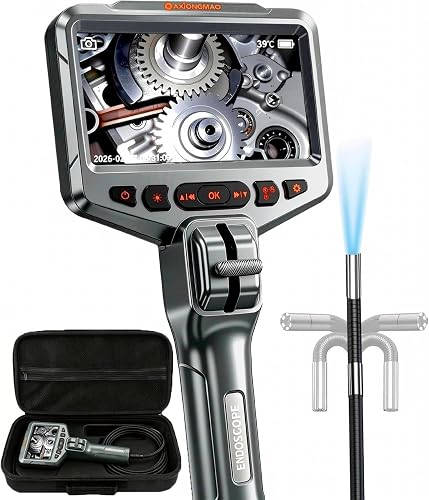
Daxiongmao Articulating Borescope
Best for basic screen checks - 6
 Check it
Ralcam 360 Articulating Borescope for HVAC
Best for front-side comparisons - 7
 Check it
Teslong Dual-Lens 4-Way Articulating Borescope
Best for narrated service records - 8
 Check it
KAIWEETS Dual-Lens Two-Way Articulating Borescope
Best for split-screen checks
How we chose the best borescope for HVAC checks
The best borescope for HVAC work matches the access route and the view you need. We compared probe diameter, articulation, camera direction, cable length, screen or phone connection, lighting and recording options.
We favored features that can make positioning and reviewing an image more practical in tight service spaces. Scores reflect how well each scope's stated features fit HVAC checks.
| Product | Best for | Probe diameter | Probe control | Storage | Our score |
|---|---|---|---|---|---|
| Ralcam 360 Articulating Borescope, 6.2 mm | narrow duct openings | 6.2 mm | Four-way articulation | 32GB Micro SD card | 8.3 |
| DXZtoz Dual-Lens Articulating Borescope | sidewall viewing | 0.25 in | 8.2 | ||
| Teslong USB-C Two-Way Articulating Borescope | phone-based inspections | 8.1 | |||
| FOXWELL 2-Way Articulating Borescope, 1080P | longer duct reaches | 0.24 in | 8.0 | ||
| Daxiongmao Articulating Borescope | basic screen checks | 7.8 | |||
| Ralcam 360 Articulating Borescope for HVAC | front-side comparisons | 6.5 mm | 32GB card | 7.6 | |
| Teslong Dual-Lens 4-Way Articulating Borescope | narrated service records | 32GB Micro SD card | 7.5 | ||
| KAIWEETS Dual-Lens Two-Way Articulating Borescope | split-screen checks | 0.25 in | 7.3 |
What makes a borescope useful for HVAC checks?
A borescope is useful for HVAC checks when its probe can reach the target and you can aim the camera at the area you need to see. A slim probe helps with narrow openings, while articulation lets you angle the camera around an edge or bend.
Measure the access opening before choosing a scope. Probe diameter is only one part of fit: account for the cable's path, any bend at the opening and the space needed to steer the head.
The cable must reach the target without being sharply bent. A semi-rigid cable can hold a curve while you guide it, but the probe still needs room to move and face the inspection area.
Lighting and focus affect the image as much as camera resolution. Adjustable LEDs let you change brightness in a dim cavity or around reflective metal, while the focus range tells you how near the lens can be to the surface and still show detail.
A camera that is too close can produce a blurry view, even if it fits through the opening. Before inserting the scope far into a duct or cavity, check the focus guidance for that model and adjust the probe distance if the image is unclear.
Which borescope control and camera view do you need?
Four-way articulation offers control in more directions than a two-way head, while dual lenses add a side-facing view. The useful combination depends on whether you need to steer around corners, see an adjacent surface or inspect a mostly straight path.
A single front camera keeps the task simple when you can point the probe directly at the area. A side camera can help when the target sits beside the probe and turning the cable would be difficult.
More articulation does not automatically make a scope the best fit. Consider how much clearance you have to bend the head, whether you can control it comfortably, and if the route calls for a front view, side view or both.
The Klein borescope guide compares another set of handheld scopes. Our Wi-Fi borescope vs screen camera guide explains the trade-offs between phone-based and standalone viewing.
Which screen and recording setup fits HVAC work?
A standalone screen works without attaching a phone, while a USB-C borescope can use a device you already carry. Before choosing a phone-connected model, confirm that your phone supports the connection and app it requires.
A built-in display can be easier to position beside the work area, especially if you need both hands to guide the probe. Screen size matters for viewing details, but a larger screen does not compensate for an out-of-focus image or an awkward camera angle.
Recording is useful when you need to revisit an image, share a finding or keep a service note. Check whether the scope saves photos, video or audio, and how files transfer to another device.
Some models include a memory card, while others rely on a connected phone or a separate storage method. Decide before buying whether you need saved evidence or only a live view, since those needs can point to different scopes.
How should you set up a borescope for an HVAC check?
Set up the scope before opening or entering the inspection space. Charge the device if it has a rechargeable battery, check that the screen or phone connection works, and confirm that the camera produces a clear image at a useful distance.
If the model records to a memory card, make sure the card is inserted and that you know how to start and stop capture. For an app-based scope, install the required app and check phone compatibility before you are standing at the access point.
Set LED brightness low to start, then raise it only as needed. Bright light can reflect off metal or pale surfaces and wash out detail, so adjust illumination while watching the display.
Make a simple plan for the route. Decide where the probe will enter, which surface you want to inspect first, how far it needs to reach and how you will retrieve it without scraping or snagging the cable.
For an articulating head, practice small control movements in open space before placing the probe. A slight joystick or wheel adjustment is often easier to track than a large bend made after the camera is already inside a crowded cavity.
What care and use tips help protect an inspection camera?
Keep the probe clean and follow the care instructions for the scope. A dirty lens can blur the image; use a lint-free cloth if the manufacturer calls for it, and remove a lens cap before cleaning.
Guide the cable with broad, controlled bends. Avoid forcing it around a sharp corner, folding it tightly or looping it while using articulation, since that can make steering harder and may strain the cable.
Use accessories only for the purpose they are designed for. A hook or magnet can help retrieve a small object, but pulling it through a narrow route can snag the cable or damage the surrounding equipment.
Treat water-resistance claims as applying only to the named component. For example, an IP67-rated probe does not mean the handle, monitor or full device can be immersed or used in every wet area.
Clean and dry the probe as directed after an inspection, then store the cable without tight kinks. Keep the scope and its accessories together so the next setup starts with a clean lens, charged device and the right storage card or phone.
Which borescope is right for your HVAC check?
The Ralcam 360 is the strongest overall match for a narrow access point where four-way control and a standalone screen matter. Its 6.2 mm probe is the slimmest stated option in this group, but its single camera view means you may need to reposition it to inspect a side surface.
Ralcam 360 Articulating Borescope, 6.2 mm: Best for narrow duct openings
- 6.2 mm probe
- Four-way articulation
- Built-in monitor
- 32GB Micro SD card
A slim probe and joystick steering suit inspections where you need to look around an HVAC component. The built-in monitor and storage support photo and video capture without a phone app.
Pros
- Slim 6.2 mm probe
- Four-way steering
- No phone, Wi-Fi or app required
Cons
- Single camera view
- Probe depth of field is 20–100 mm
The Ralcam pairs a 6.2 mm probe with four-way articulation. The joystick steers the head, and the built-in display lets you view the camera without a phone, Wi-Fi or app.
It records JPG images and AVI video to an included 32GB Micro SD card. Six LEDs around the probe have adjustable brightness for dark spaces.
The stated depth of field is 20–100 mm. Keep the lens within that range when you need a clear image, and choose another model if you need front and side views without turning the probe.
Pick it for a small opening and direct screen control. Skip it if dual-lens viewing is a must-have.
The DXZtoz is the better fit when seeing both ahead and to the side matters. Its dual views, larger display and screen bracket support a workflow where you need to watch the image while guiding the cable.
DXZtoz Dual-Lens Articulating Borescope: Best for sidewall viewing
- Dual lens
- 5 in screen
- Two-way articulation
- Hook and magnet accessories
The two camera views can help inspect a duct or equipment space without turning the probe for every angle. Its 5 in screen and screen bracket make viewing easier while you guide the cable.
Pros
- Front and side camera views
- 5 in screen
- Hook and magnet included
Cons
- Manual focus
- Two-way articulation
The DXZtoz gives you front and side camera views on a 5 in screen. That can help when a duct path or equipment cavity puts the target beside the probe rather than directly ahead.
Its two-way articulated head bends to position the camera, and the screen bracket can hold the display while you guide the cable. The 0.25 in probe is wider than the 6.2 mm Ralcam option, so compare it with the access opening before you choose.
The included hook and magnet can help retrieve a small metal item. DXZtoz describes the rechargeable battery as covering 5–6 hours after a full charge.
Choose it for two viewing directions and a larger screen. Skip it if you need four-way articulation or automatic focus.
Teslong USB-C makes sense when your phone is already part of your work setup and is compatible with the scope. It gives you a phone-based view and capture method in a compact kit.
Teslong USB-C Two-Way Articulating Borescope: Best for phone-based inspections
- USB-C connection
- 180-degree articulation
- 5 ft semi-rigid cable
- 8 adjustable LEDs
This scope connects to compatible USB-C phones and uses the SmartEndoscope app for photo and video capture. Its semi-rigid cable holds a bend to help position the camera in a duct or wall cavity.
Pros
- Works with compatible USB-C phones
- 180-degree articulating probe
- Three brightness levels
Cons
- Requires a compatible phone and app
- Phone case may need to come off
The Teslong USB-C model suits readers who want to use a compatible phone as the display. Its 180-degree articulating probe and 5 ft semi-rigid cable can be bent to reach a wall cavity, duct or space behind an appliance.
It connects to compatible USB-C phones and uses the SmartEndoscope app for photo and video capture. Eight adjustable LEDs provide illumination, with three brightness levels.
The model supports iPhone 15 and later with USB-C, USB-C iPads and Android phones running version 8.0 or later with OTG enabled. A thick phone case may need to come off to fit the holder.
Choose it if phone-based viewing is convenient. Skip it if you want a standalone screen or do not want to depend on a compatible app and device.
FOXWELL suits HVAC users who want a slim probe, a standalone screen and a cable that reaches farther than a 5 ft option. Its two-way head offers less directional control than four-way designs, but the 220-degree articulation provides a broad bend.
FOXWELL 2-Way Articulating Borescope, 1080P: Best for longer duct reaches
- 0.24 in probe
- 220-degree articulation
- 5.3 ft gooseneck
- 32GB storage
The slim probe and 220-degree two-way articulation suit tight turns around HVAC equipment. FOXWELL describes a standalone setup with a built-in battery and storage, so no phone app or Wi-Fi is needed.
Pros
- 0.24 in probe
- 220-degree articulation
- No app or Wi-Fi required
Cons
- Two-way rather than four-way articulation
- Heat protection shuts the unit off at 158°F
FOXWELL combines a 0.24 in probe with 220-degree two-way articulation. Its 5.3 ft semi-rigid gooseneck holds a bend as you guide it.
The unit works without Wi-Fi or an app and has 32GB of storage for captured media. Six adjustable LED lights provide illumination, with 2x and 4x zoom options for closer viewing.
FOXWELL says the probe is IP67 rated and includes heat protection that shuts the device off at 158°F. Check the space temperature before insertion and follow the HVAC equipment's safety guidance.
Choose FOXWELL for a standalone camera with a slim probe and a slightly longer cable than 5 ft models. Skip it if you need four-way control or if the work area may reach its stated heat shutoff point.
Daxiongmao is a straightforward choice for a live view on a built-in display without phone setup. It fits basic checks where a single camera angle and two-way steering are enough.
Daxiongmao Articulating Borescope: Best for basic screen checks
- 210-degree two-way articulation
- 4.5 in IPS screen
- 5 ft semi-rigid cable
- IP67-rated probe
A built-in screen and two-way steerable head keep the setup straightforward for checking a duct or equipment cavity. The maker identifies the probe as IP67 rated for wet or dusty conditions.
Pros
- Built-in IPS screen
- 210-degree articulation
- No extra app required
Cons
- Single camera view
- No included recording capacity stated
The Daxiongmao has a 210-degree two-way head and 5 ft semi-rigid cable for basic checks around HVAC equipment and other tight spaces. A 4.5 in IPS screen shows the live view, and six adjustable LEDs illuminate dark areas.
The maker describes the probe as IP67 rated for damp, oily and dusty conditions. The package includes a portable bag, charging cable and 32GB storage card.
This model has one camera view, so you need to point the probe toward the area you want to inspect. Choose it for a simple screen setup; skip it if dual-lens viewing or four-way control would save time in your access route.
The second Ralcam is a good choice when you want a built-in screen, two camera directions and four-way steering together. Its probe is slightly wider than the top pick, so confirm that it fits the opening first.
Ralcam 360 Articulating Borescope for HVAC: Best for front-side comparisons
- Dual lens
- 6.5 mm probe
- 4-way articulation
- 5 in IPS screen
The front and side lenses give you two viewing directions, while four-way articulation lets you steer around obstructions. Its 5 in screen and included 32GB card support viewing and saving inspection images.
Pros
- Front and side lenses
- Four-way articulation
- 5 in screen
Cons
- Default resolution is 720p
- Semi-rigid cable needs careful handling
The Ralcam HVAC model pairs front and side lenses with four-way articulation. The dual views can help you check an adjacent surface, while the joystick gives you control over probe direction.
It has a 6.5 mm probe, a 5 in IPS display and a 5 ft semi-rigid cable. The included 32GB card supports photo and video capture, and the probe is described as IP67 rated.
Ralcam states that the default resolution is 720p, with a 1080p option available through the instructions. Keep the cable straight and avoid folding or looping it while using articulation, as the brand advises.
Choose it when dual views and a built-in screen matter more than the narrowest possible probe. Skip it if access is extremely tight or you need the default image setting to be 1080p.
The Teslong Dual-Lens 4-Way is suited to inspections where you want to save spoken observations alongside images and video. Its own screen and memory card keep capture separate from a phone.
Teslong Dual-Lens 4-Way Articulating Borescope: Best for narrated service records
- Dual lens
- Four-way articulation
- 5 in IPS display
- Photo, video and audio recording
Two camera views and four-way articulation help inspect around corners, while photo, video and audio recording can keep observations together. The included card provides storage for saved inspection media.
Pros
- Front and side camera views
- Audio recording supported
- 32GB Micro SD card included
Cons
- Probe diameter is 0.25 in
- No specific battery runtime stated
The Teslong Dual-Lens 4-Way supports audio recording as well as photos and video, so you can attach a spoken observation to an inspection file. Its two cameras provide front and side views, and the 5 in IPS display shows the image without a phone.
The 5 ft cable has four-way articulation, and a 32GB Micro SD card is included. The kit also includes a hook and magnet attachment for retrieving small objects.
The 0.25 in probe suits access openings that can accommodate that diameter. Choose it when saved notes are useful; skip it if you need a published battery runtime before choosing a scope.
KAIWEETS is a strong match when comparing front and side views on one screen is central to the job. Its split-screen mode makes it easier to keep both angles visible without relying on a phone.
KAIWEETS Dual-Lens Two-Way Articulating Borescope: Best for split-screen checks
- Front and side cameras
- 210-degree two-way articulation
- 5.3 ft semi-rigid cable
- 4.3 in IPS monitor
Switch among front, side and split-screen views to compare angles inside a duct. The standalone monitor avoids phone pairing, and the semi-rigid cable holds its shape as you position the probe.
Pros
- Front, side and split-screen views
- 5.3 ft semi-rigid cable
- No phone or app required
Cons
- Two-way articulation
- Smallest screen in this roundup
The KAIWEETS uses front and side cameras with a 4.3 in IPS monitor, and it can switch among front view, side view and split-screen mode. That setup is useful when comparing two angles inside an HVAC space.
Its 0.25 in probe has two-way articulation and a 5.3 ft semi-rigid cable. The manufacturer describes the probe as IP67 rated, and the rechargeable battery is stated to last up to five hours.
The package includes a carrying case, magnet, hook, side mirror and a pre-installed lens protector. Choose KAIWEETS if dual views and a standalone monitor are your main needs; skip it if you prefer a larger display or four-way articulation.
How should you choose a borescope for HVAC ducts?
Choose a borescope for HVAC ducts by checking the opening size, cable reach and direction you need to inspect. A longer cable is useful only if the probe can pass through the access point and reach the target without a sharp bend.
For a narrow opening, compare probe diameter first. For a turn or obstruction, look at articulation and whether a side camera would help you see the target without twisting the whole cable.
Think about how you will guide and view the camera at the same time. A screen bracket or separate monitor can help when both hands are occupied; a phone may suit you if you already use a compatible device and app.
Check the focus distance too. A scope may enter a space easily but still give a poor image if the lens sits too near or too far from the surface you need to inspect.
Finally, decide whether you need to save the result. Live viewing may be enough for a quick check, while a memory card, phone capture or audio recording can help document a finding for follow-up.
What common borescope mistakes should you avoid?
The most common mistake is choosing by screen size or resolution before checking access. A larger display cannot help if the probe is too wide for the opening or the cable cannot reach the area.
Another mistake is pushing the probe forward without watching its position. Move in small increments, keep track of the cable path and stop if the probe meets resistance instead of trying to force it through.
Avoid bending an articulating probe hard against an obstruction. Use small control adjustments, and withdraw the camera enough to change its approach when the head cannot turn freely.
Do not assume that every part of a water-resistant scope can get wet. Check which part carries the rating and keep the monitor and handle away from moisture unless the manufacturer says otherwise.
A blurry image is not always a sign of a poor camera. The lens may need cleaning, the brightness may be too high, or the target may be outside the focus range; adjust those factors before drawing a conclusion.
What safety checks matter before inserting a scope?
Turn HVAC equipment off when required by its manufacturer's instructions, and keep the probe away from moving parts, electrical hazards and hot surfaces. Never force a cable through a tight opening or place it where it could become trapped.
Check the scope's operating limits and care instructions before using it in a damp or hot area. A waterproof probe rating applies to the probe and does not mean the monitor, handle or entire device can be exposed to water.
If the inspection requires opening equipment or working near electrical components, use a qualified HVAC technician. A borescope can show an area, but it does not replace safe service procedures.
Which best borescope for HVAC checks should you choose?
Pick the Ralcam 360 with the 6.2 mm probe if you need a slim camera and four-way control on a standalone screen. Choose DXZtoz or KAIWEETS when front and side views are important, and select Teslong USB-C when your compatible phone is the display you prefer.
For a basic live view, Daxiongmao keeps the setup simple. FOXWELL adds a slim probe and longer reach, while the second Ralcam and Teslong Dual-Lens suit buyers who want dual views with four-way steering.
Match probe diameter and cable reach to the access route, then choose the viewing and recording setup that fits how you work. For a related hidden-space inspection, see our guide to checking an attic with an inspection camera, and follow HVAC safety instructions before you begin.
Our top 3 picks at a glance
-
1
Best for narrow duct openings
Ralcam 360 Articulating Borescope, 6.2 mm
8.3/10 our score
See it on Amazon -
2
-
3
Best for phone-based inspections
Teslong USB-C Two-Way Articulating Borescope
8.1/10 our score
See it on Amazon
Frequently asked questions
What should I look for in a borescope for HVAC?
Start with the probe diameter and your access opening, then compare articulation, cable reach, lighting and screen type. A slim probe may fit a narrow port, while a steerable head helps aim around an edge.
A built-in screen avoids phone compatibility questions.
Check the focus range and storage method too, especially if you need to save images.
Is a dual-lens borescope useful for HVAC checks?
A dual-lens borescope can show front and side views, which helps when a duct or component is difficult to inspect by turning the probe. It can make adjacent surfaces easier to view, but a single front-facing camera may be enough for a straight, open path.
Choose based on the angles you need to see.
Should I choose a phone borescope or one with a screen?
A phone borescope can be compact and use a device you already carry, but it depends on a compatible phone and any required app. A scope with its own screen works as a separate inspection tool and keeps the viewing setup independent of your phone.
Check your device's connection support before buying.
Can I use a borescope in a running HVAC system?
Follow the HVAC equipment maker's safety instructions and turn equipment off when required before placing a probe inside. Keep the scope away from moving parts, hot surfaces and electrical hazards, and don't force it through an opening.
Use a qualified technician when access or the inspection itself could put you at risk.


