How to Use a Borescope for HVAC Checks at Home
To learn how to use a borescope for HVAC checks, turn the system off, choose a safe existing access point, and guide the camera slowly. Note visible debris, moisture, or damage, then ask an HVAC technician about concerns.
On this page (8 sections)
- How do you use a borescope for HVAC checks?
- Where can you inspect with a borescope?
- What should you look for inside an HVAC duct?
- How do you choose a borescope for HVAC?
- How should you set up and care for the camera?
- What common mistakes should you avoid?
- When should you call an HVAC technician?
- Which borescope should you choose for HVAC checks?
To learn how to use a borescope for HVAC checks, turn the system off, use a safe existing access point, and move the camera slowly. Look for visible debris, moisture, corrosion, or damage, then ask an HVAC technician about anything concerning.
A borescope is a small camera on a probe that lets you see into a space without removing a large section of ductwork. It shows only the area in view, so it can help document a concern but can't diagnose the whole heating and cooling system.
How do you use a borescope for HVAC checks?
Shut down the equipment, check the camera, and guide the probe gently through an existing opening. Keep the route and the probe tip in view as much as possible, and retrieve the camera before restoring power.
- Read the equipment manual and follow its shutdown steps.
- Pick an existing access point, such as a removable vent cover, that gives you a clear route.
- Check the probe, camera lens, and cable for dirt or damage.
- Switch on the camera and adjust its light until the image is clear.
- Feed the probe slowly, pausing to look at nearby surfaces and save useful images.
- Withdraw it slowly, replace any cover you removed, and make sure the area is clear before restarting the system.
Don't force the probe around a tight turn or use it to push aside insulation, wires, or debris. Stop if it catches, meets resistance, or disappears into an area where you can't guide it back safely.
A calm, slow pass is usually more useful than trying to cover a large area quickly. Pause when the image is unclear, adjust the light or angle, and pull back if the probe tip touches a surface.
Where can you inspect with a borescope?
Use a borescope only through an existing opening that gives you a safe path to a visible area. Accessible duct interiors and the spaces just behind removable vent covers are common examples.
Depending on the layout, you may also be able to see into an accessible plenum. Avoid inserting a camera through a furnace panel.
Don't insert it into electrical, burner, or fan compartments. Those areas can pose hazards and may need a qualified technician.
For a separate look at upper spaces, see our guide to checking an attic with an inspection camera. Attic access brings its own risks from wiring, insulation, and limited footing, so don't treat it as an extension of a duct inspection.
Can you inspect a duct through a vent?
Yes, if the cover comes off easily and the opening gives the probe a clear route. Don't remove a sealed cover or a part of the system that you can't safely restore.
A view from one vent shows only the nearby area and the direction the camera can face. It may miss issues farther down the duct or in other branches, so don't use one short view to judge the whole system.
What should you look for inside an HVAC duct?
Look for visible debris, moisture, corrosion, loose material, or obvious damage near the camera. Save an image when it helps you show a technician what you saw, and avoid touching or disturbing the material.
Dust on a surface alone doesn't mean the whole system needs cleaning or that the dust poses a health risk. Standing water, moisture, heavy buildup, damaged duct lining, or material that may be mold calls for professional advice.
Shadows, glare, and the camera's angle can make surfaces hard to interpret. Take images from more than one angle when safe, but don't treat a close-up image as a full diagnosis or proof that hidden areas are clear.
How do you choose a borescope for HVAC?
Match the camera to the opening, viewing angle, probe reach, and screen setup you prefer. A slim probe may fit a narrow access point, while an articulating head or dual-lens camera can make it easier to look in different directions.
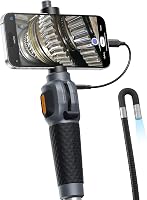
Decide first whether you want to view images on a built-in screen or a compatible phone. A phone-based camera can suit someone who already has a compatible device and prefers app capture; a model with its own screen is a more direct choice if you don't want to rely on a phone.
The best borescopes for HVAC checks guide compares options for different inspection needs. For more on screen and phone setups, read Wi-Fi borescope vs. inspection camera with a screen.
Which borescope features help in tight HVAC spaces?
A slim probe can help with narrow openings, and an articulating head gives you control over the viewing direction. Choose those features when the path or angle matters more than a long reach.
The Ralcam is a fit for someone who wants to steer the camera from a built-in monitor without a phone app. Its 6.2 mm probe has a 4-way articulating head that locks at an angle, and it saves photos and video to a built-in 32GB Micro SD card.
The Teslong is a better fit if you want to use a compatible USB-C phone for viewing and capture. Its 5 ft semi-rigid cable and 180-degree articulating probe suit shorter routes where a phone is convenient.
Skip a phone-connected camera if your device isn't supported or you'd rather avoid app setup. Before choosing either model, check the access opening and make sure you can guide the probe in and out without force.
What if you want front and side views?
A dual-lens camera can show forward and side views, which helps when one direction doesn't reveal the surface you need to see. It is useful for looking around an accessible bend or viewing nearby duct surfaces from a single opening.
The Klein Tools ET19 suits someone who wants a built-in screen and a longer probe. Its dual-lens camera, 9.8 ft armored snake, and 4.3 in LCD make it an option for routes that need more reach; images and video can be transferred through its app or USB-C port.
The DXZtoz suits a buyer who wants a larger built-in screen with front and side views. Its screen bracket can support hands-free viewing while you guide the handle.
Skip a dual-lens model if one forward view is enough for the opening you plan to inspect. Extra views are useful only when they help you see a specific area.
How should you set up and care for the camera?
Start with a clean lens, a charged or connected device, and a planned route into the space. A quick setup check helps you avoid losing the view or getting the probe stuck after insertion.
Read the camera's instructions before use, especially for connecting a phone or saving images. Test the display and light outside the duct, then set brightness to a level that shows surface detail without washing out the image.
Keep the cable in a gentle curve and guide it with your hands. Don't use the probe to pull against a snag or force a sharp bend.
Withdraw it slowly when you finish, and clean the lens as the camera instructions direct.
A dirty lens can blur the view, while a camera held too close or too far from a surface may not show useful detail. Adjust the angle and distance before deciding that a surface is damaged or clear.
What common mistakes should you avoid?
The most common mistakes are inspecting with the system running, forcing the probe, and assuming one camera view represents the full system. Each can create risk or lead to a misleading conclusion.
Keep the equipment off during the inspection, and never reach into a fan or electrical compartment. Use only an opening that already exists and that you can safely access and restore.
Don't push the probe through resistance or use it to move insulation, wires, or debris. A flexible cable still needs careful control, and a route you can't safely reverse is a good reason to stop.
Don't mistake a camera image for an airflow measurement or a safety check. If the HVAC system has poor airflow, unusual smells, or repeated performance problems, have a technician inspect the system rather than trying to diagnose it through a camera.
When should you call an HVAC technician?
Call a technician if you see moisture, damage, heavy buildup, suspected mold, or anything near electrical or combustion parts. Get professional help for poor airflow, unusual smells, or repeated system problems even when the camera view looks normal.
A borescope doesn't measure airflow or temperature, diagnose refrigerant problems, or determine whether equipment is safe to operate. Share saved images with the technician if they help explain where you looked and what caught your attention.
If your inspection is in a crawl space rather than a duct, our inspection camera guide for crawl spaces covers that separate access problem.
Which borescope should you choose for HVAC checks?
Choose the camera that fits your access route and viewing preference, then use it only for a careful visual check. Pick the Ralcam for a slim probe and steerable head with built-in capture, the Teslong for compatible USB-C phone use, the Klein Tools ET19 for extra reach and its own screen, or the DXZtoz for front and side views on a larger screen.
Skip any camera if the probe won't fit the opening or you can't guide and retrieve it without force. Turn the system off and stay with visible areas.
Call a professional for diagnosis or repairs. For a different kind of camera inspection, our guide to using a sewer camera on your own drain line explains how to inspect a home drain safely.
Frequently asked questions
Can I use a borescope to inspect HVAC ducts?
Yes, a borescope can show visible conditions inside a duct through an existing access point. Turn off the HVAC system first, keep the probe clear of moving parts and sharp edges, and don't cut into ducts or reach into equipment.
A camera view is limited and can't confirm system performance.
Should the HVAC system be on or off during a borescope inspection?
Turn the HVAC system off before inserting a borescope. This reduces the risk of contacting moving parts and keeps airflow from pulling dust or debris toward the probe.
Follow the equipment manual for safe shutdown, and don't open electrical or combustion compartments unless you're qualified to do so.
What can a borescope show in an HVAC system?
A borescope may show visible dust, debris, moisture, corrosion, loose material, or damage near the camera. It can't measure airflow, confirm a refrigerant problem, or prove that a component is safe.
Ask an HVAC technician to interpret concerning images and diagnose performance or safety issues.
Can I clean an HVAC duct after checking it with a borescope?
A borescope inspection can help you see whether debris is present, but it doesn't make duct cleaning necessary by itself. Don't push household tools deep into a duct or spray cleaners into the system.
If you see heavy buildup, moisture, or suspected mold, ask a qualified professional what to do.