Wi-Fi Borescope vs Inspection Camera With a Screen: Which Is Better? (October 2026)
Choose a Wi-Fi borescope for phone-based viewing at nearby inspection points, or a screen camera when you want a built-in display and longer cable reach. Match the connection, probe and cable to the job.
On this page (9 sections)
- Wi-Fi borescope vs inspection camera with a screen: what changes?
- Which camera reaches farther into a pipe or wall?
- Which camera gives you more control over the view?
- Which display works best during an inspection?
- How do power, storage and lighting affect the choice?
- How do you set up and use an inspection camera?
- What common buying and use mistakes should you avoid?
- Which camera should you choose for home use?
- Wi-Fi borescope vs inspection camera: which is right for you?
For a Wi-Fi borescope vs inspection camera choice, match the cable to the distance and the display to how you want to work. A Wi-Fi model sends the view to a compatible phone or tablet, while a screen camera has its own display.
The Klein Tools ET20 sends video to a phone or tablet over Wi-Fi and has a 6 ft cable. The DEPSTECH pairs a built-in 5-inch screen with a 50 ft cable, which makes it the better fit when the inspection point is farther inside a pipe or cavity.
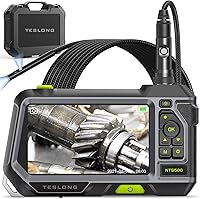
The Teslong is a third option: it connects to compatible devices over USB-C and has a probe that articulates. It suits nearby spaces where steering the camera matters more than cable reach.
 Best for longer pipe runs
DEPSTECH 50 ft Triple-Lens Camera, 5-Inch Screen
 Best for steering around corners
Teslong USB-C Two-Way Articulating Borescope
Wi-Fi borescope vs inspection camera with a screen: what changes?
A Wi-Fi borescope uses your compatible phone or tablet as the display, while a screen camera displays the image on the tool. That choice affects setup, file handling and whether you need to bring a second device into the work area.
The Klein ET20 transmits images and video to a smartphone or tablet up to 30 ft away. Its app displays, records, stores and shares captured files.
The Wi-Fi link is between the camera and device, so follow the model's instructions for pairing and app setup before inserting the probe.
The DEPSTECH has a 5-inch IPS screen built into its handheld monitor and includes a 32GB memory card for photos and video. It keeps the viewing display with the camera, so you don't need to use a phone as the monitor.
A phone display can be convenient when your phone is already part of the job, but it adds compatibility and setup checks. A built-in screen is a simpler choice if you'd rather keep the camera's controls and image together.
How should you compare a Wi-Fi borescope with a screen camera?
Compare the connection, cable reach and probe movement in that order. These factors determine whether the tool can reach the target and show it in a useful way.
- Choose Wi-Fi if you want to view, save and share images through a compatible phone or tablet.
- Choose a built-in screen if you want the display attached to the camera or need a longer cable option.
- Choose USB-C if your device supports a direct connection and you want to steer a nearby probe with the Teslong joystick.
The connection doesn't determine reach. The Klein is wireless but has a 6 ft cable, while DEPSTECH's separate-screen camera reaches 50 ft.
Which camera reaches farther into a pipe or wall?
The DEPSTECH reaches farthest, with a 50 ft semi-rigid cable; the Klein ET20 and Teslong have 6 ft and 5 ft cables. Estimate the path from the access point to the area you want to view before choosing among them.
A long cable can reach deeper into a drain or wall cavity, but it needs more room to feed, guide and retrieve. DEPSTECH recommends using a cable puller to help maneuver its cable.
Plan how you'll handle the extra length before starting, especially in a confined work area.
The shorter Klein and Teslong probes fit nearby targets, such as a plumbing trap, an appliance space or an HVAC opening. They aren't substitutes for a long-reach sewer camera if the suspected issue is deep in a drain line.
If you're checking a drain, see our guide to choosing a drain camera by cable, head and screen. For a sewer line, the sewer camera buying guide explains what to compare for longer runs.
Is a Wi-Fi borescope suitable for a sewer line?
A short Wi-Fi borescope is usually a poor match for inspecting far down a sewer line. Its phone connection may be convenient, but the cable length sets how far the camera can travel.
The Klein ET20's 6 ft armored gooseneck is intended for nearby inspection points. For longer runs, look for a camera with enough cable to reach the area, and consider how the cable will move through the pipe.
For a more detailed look at sewer camera use and reach, read how to use a sewer camera on your own drain line. A long cable still needs careful handling and a clear plan for feeding it into the access point.
Which camera gives you more control over the view?
The Teslong lets you steer its probe, while DEPSTECH lets you switch between front and side views. Those are different kinds of control: one changes the probe direction, and the other changes which camera angle you see.
The Teslong's joystick-controlled probe articulates up to 180 degrees. Its 5 ft semi-rigid cable holds its shape, making it useful when you can position the probe near a target and then aim around a corner.
DEPSTECH's triple-lens camera switches between front and side views. That can help when you need to examine a surface beside the camera head as well as the path directly ahead.
The Klein ET20 has a fixed-focus camera and adjustable LED output. You can adjust the lights on the borescope or in the app, but its features don't include an articulating head or selectable side view.
When does an articulating borescope help with plumbing?
An articulating probe helps when the target is nearby but sits around a bend or off to one side. The Teslong gives you joystick control over its camera direction, which can be useful in traps and tight spaces.
That movement doesn't extend the cable. If the target is far into a pipe, reach matters more than the ability to aim, so choose a longer camera designed for the distance.
For other plumbing options, see inspection cameras for plumbing work.
Which display works best during an inspection?
A built-in screen keeps the image on the camera, while a phone-based borescope turns your compatible device into the display. Think about where you'll hold the camera, whether you need both hands and how you want to save the images.
DEPSTECH's screen is part of its handheld monitor. The kit also includes a protective case, USB charging cable, user manual, hook and magnet accessories.
The screen and camera operate as one setup, with captured files stored on the included memory card.
With the Klein, you use its app on a compatible smartphone or tablet. The app stores and shares images and video.
The borescope has a battery status indicator, and wireless viewing lets the phone sit up to 30 ft from the camera.
The Teslong connects to compatible USB-C phones and tablets and works with its SmartEndoscope app. Its phone holder fits most devices, though thick cases may need to come off some larger phones.
If you don't want to rely on a phone or app, the DEPSTECH's dedicated screen is the clearest fit here. If you already carry a compatible device and want app-based capture, consider the Klein or Teslong.
How do power, storage and lighting affect the choice?
Choose based on whether the stated battery life, included storage and lighting controls suit the length and conditions of your job. These details matter after you confirm that the probe can reach the target.
DEPSTECH offers up to 4 hours of continuous use and includes a 32GB memory card. The Klein ET20's rechargeable battery has an average life of 5.5 hours, and its app can store captured photos and video.
The Teslong captures photos and video through its app, but runtime isn't specified here. Check its power requirements before planning a long session.
All three provide camera lighting. DEPSTECH has adjustable camera lights, and the Klein has 6 adjustable LEDs.
The Teslong has 8 LEDs with 3 brightness levels. Adjust lighting to the surface and space, since bright light can reflect off nearby surfaces and make details harder to see.
How do you set up and use an inspection camera?
Set up the camera before inserting the probe, and confirm that the display and capture method work first. A short check helps prevent missed images or a stalled inspection once the camera is in a tight space.
- Check the route and access point. Make sure the probe can enter without forcing it, and decide how much cable you need to feed.
- Prepare the display. Turn on the built-in DEPSTECH monitor, pair the Klein with its compatible device and app, or connect the Teslong by USB-C and open its app.
- Set the light level. Start with enough illumination to see the target, then adjust if glare or darkness obscures details.
- Advance the probe gradually. Keep the cable under control and pause when you reach a bend or area you want to inspect.
- Capture useful views. Save a photo or video when you see a relevant feature, and note the probe position so you can find it again.
- Retrieve and clean the probe. Pull it back carefully, then clean and dry the camera and cable according to the instructions for that model.
For a longer sewer inspection, read how to use a sewer camera on your own drain line. For a compact HVAC check, see how to use a borescope for HVAC checks.
What common buying and use mistakes should you avoid?
The most common mistake is choosing by connection type before checking reach. A wireless camera still won't help if its cable can't get to the target.
- Assuming Wi-Fi means internet access: Wi-Fi describes a device connection, but app and network requirements depend on the model. Read setup instructions and confirm compatibility.
- Buying too little cable: Measure or estimate the distance from the access point to the inspection area, with extra room to guide the probe.
- Expecting every probe to turn: The Teslong articulates; the Klein ET20's listed features don't include articulation. Choose probe movement for the space.
- Forcing a cable through a bend: Advance gradually and stop if the probe resists. For DEPSTECH's longer cable, consider the recommended cable puller.
- Forgetting file storage: Confirm where images and video will be saved and how you'll review or share them. DEPSTECH includes a memory card; phone-based models use their apps.
- Leaving the camera dirty or wet after use: Clean and dry it as the model instructions allow, then store it with its accessories protected.
A camera image can help you see an area, but it doesn't by itself explain the cause of a plumbing or structural problem. If you need a diagnosis or repair plan, share clear images with a qualified professional.
Which camera should you choose for home use?
Choose by job distance first, then select the display and probe control that fit your work. A camera for a short HVAC check may not reach far enough into a sewer line.
- Choose DEPSTECH for a built-in screen, long cable reach and front and side views. It is the clear match for longer pipe runs among these three.
- Choose Teslong for a short cable, direct USB-C connection and joystick steering. It suits nearby targets where the angle matters more than reach.
- Choose Klein ET20 for wireless viewing, app-based capture and a short armored probe. Pick it when a compatible phone or tablet is convenient for close inspection work.
The handheld borescope guide compares more options by use. For deep drain work, focus on cable length and camera design before choosing a display connection.
Wi-Fi borescope vs inspection camera: which is right for you?
Pick a Wi-Fi borescope for nearby checks when you want phone-based viewing; pick a screen camera when you want a built-in display or longer cable reach. Choose the Teslong when a direct USB-C connection and an articulating probe suit the target.
Before you buy, check the distance to the inspection point, the probe movement you need and phone compatibility if the camera uses an app. For a sewer line, prioritize enough cable to reach the area and a camera suited to pipe work.
Frequently asked questions
Is a Wi-Fi borescope better than an inspection camera with a screen?
A Wi-Fi borescope suits you when you want to use a compatible phone as the display and save images through an app. A camera with a screen suits you when you want built-in viewing or longer cable reach.
Compare connection, probe direction and cable length with the space you need to inspect.
Can a Wi-Fi borescope inspect a sewer line?
A short Wi-Fi borescope is suited to nearby access points, while a 50 ft pipe camera can reach farther into a line. The Klein ET20 has a 6 ft gooseneck, and the DEPSTECH has a 50 ft cable with a separate screen.
Match reach to the suspected problem.
Do Wi-Fi borescopes need an internet connection?
Wi-Fi describes the connection between a borescope and a compatible phone, but internet access is a separate issue. Follow the model's setup instructions and check app requirements before you start.
Phone compatibility and connection steps vary by camera.
When is a USB-C borescope a better choice?
A USB-C borescope can suit you if your phone or tablet supports the connection and you want a direct link. The Teslong also has a joystick-controlled articulating probe, giving you control over the camera's direction in nearby spaces.
What matters most when choosing an inspection camera?
Start with cable reach and the viewing direction you need, then choose a display and connection. A 50 ft cable reaches farther into a pipe than a 5 or 6 ft probe, while a built-in screen lets you view images without relying on a phone display.