Borescope Buying Guide for Homeowners
The best borescope for most homeowners is a phone-connected dual-lens scope with a slim cable and adjustable light. Choose a dedicated drain camera when you need 50 ft of reach and a built-in screen.
On this page (12 sections)
- What should a homeowner use a borescope for?
- Which borescope camera type fits the job?
- How much cable length do you really need?
- Does camera diameter affect the inspection?
- Is resolution the most important image feature?
- When is a dual-lens borescope worth it?
- Which display and connection method is easiest?
- Which borescope is best for common homeowner jobs?
- What cable control and waterproofing should you expect?
- How should you prepare and use a homeowner borescope?
- Should you buy a borescope or a sewer camera?
- What is the final borescope buying rule?
The best borescope for most homeowners is a slim camera with useful lighting, enough cable for the job and a display you already know how to use. This borescope buying guide compares phone-connected scopes, Android models and dedicated drain cameras so you can match the tool to the space.
A borescope helps you see inside walls, appliances, engines, vents and pipes without opening a large section of material. The right choice depends on reach, cable control, camera size, viewing angle and how you want to review the image.
A narrow inspection behind an appliance has different needs from a sewer line. Start with the job, then select the camera type that fits it.
What should a homeowner use a borescope for?
Use a borescope for short visual inspections where a normal flashlight and mirror cannot reach. It can show the inside of a wall opening, an appliance cavity, a duct section, an engine space or a nearby drain.
The camera does not replace every repair tool. It gives you information before you remove panels, cut drywall or call for a larger inspection.
Common home uses include:
- Finding a dropped object behind a cabinet or inside a narrow gap
- Looking through an access opening in a wall
- Inspecting HVAC spaces and vents
- Viewing the inside of an appliance
- Checking a nearby drain for debris
- Looking for visible pipe damage or roots
- Inspecting automotive engine areas
- Retrieving small objects with a hook or magnet
A borescope is most useful when the camera can reach the area and the image remains clear. A long cable does not help if it is too flexible to push through the route, while a sharp image does not help if the lens is covered in murky water.
For a broader explanation of the tool itself, read what is a borescope camera.
Choose the smallest tool that reaches the space and gives you a clear view.
Which borescope camera type fits the job?
Choose a phone borescope for flexible household inspections, an Android model for a simple USB-C setup, or a dedicated drain camera for long pipe work. These categories overlap, but their controls and best uses differ.
Phone-connected borescopes
Phone scopes use your device as the display and recording screen. The DEPSTECH connects through USB Type C or a Lightning adapter and works through the DEPSTECHCAM App.
This keeps the kit compact and gives you familiar photo and video storage, with 2× zoom and 90° rotation in the app. You need a compatible phone or tablet, the correct connector and app.
DEPSTECH states that its scope needs iOS 11.0 or newer, Android 9.0 or newer and OTG support on compatible Android devices.
Dedicated monitor cameras
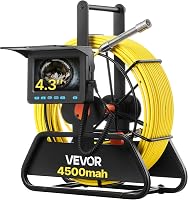
A dedicated drain camera includes its own screen. The Teslong has a 4.3 in IPS display with an adjustable viewing angle and a 50 ft dual-lens cable, which suits pipe work where your hands are busy feeding the cable.
Pick a phone scope for general home jobs, an Android scope for simple short inspections, and a monitor camera for long drains.
How much cable length do you really need?
Choose cable length by the distance from the access point to the area you need to see, then leave enough spare length for handling. More cable creates reach, but it also adds storage and control demands.
The DEPSTECH has a 16.5 ft semi-rigid cable for HVAC openings, wall cavities and nearby pipes. The Klein Tools ET16 has a 10 ft armored gooseneck cable for close work such as appliance cavities, vehicle areas and short wall openings.
The Teslong has a 50 ft semi-rigid cable for drain and plumbing inspections. Its length is designed for pipe runs rather than casual close-up checks.
Cable type matters as much as length. A semi-rigid cable bends and holds some shape, helping you direct the camera.
Teslong states that its cable works well in straight PVC sections but has limited flexibility through tight 90° elbows and P-traps.
Use 10 ft for nearby work, 16.5 ft for broader household inspection, and 50 ft only when the pipe route needs it.
Does camera diameter affect the inspection?
Yes. A smaller camera reaches narrower openings, while a larger camera can be easier to handle in open spaces.
Measure the access hole and compare it with the camera diameter before choosing.
The DEPSTECH has a 0.31 in, or 7.9 mm, scope for narrow channels and internal spaces. The Klein Tools ET16 uses an 8 mm camera, placing both in the same general class of narrow-access inspection tools.
The Teslong is built around a drain camera and 50 ft cable. Its value comes from reach and pipe viewing rather than the smallest possible camera body.
Camera diameter also affects how the lens sits inside a pipe. A camera that moves freely gives you a better chance of seeing ahead, while one that contacts the wall can lose useful visibility.
Pick the smallest diameter that reaches the opening without forcing the cable.
Is resolution the most important image feature?
Resolution matters, but usable lighting, focus range and viewing angle determine whether you can interpret the image. A higher pixel count does not make a dark inspection useful.
The DEPSTECH provides a 2560 × 1440P image and 3.69 million pixels, with Blaurt 3.0 technology and an 80° viewing angle. The Klein Tools ET16 captures 640 × 480 pixel images, uses fixed focus and has six white LEDs with adjustable brightness.
The Teslong provides a 1080-pixel camera view with front and side cameras. Its front camera has 6 LEDs and its side camera has 1 LED.
DEPSTECH gives a main lens focal range of 0.78–3.93 in and a side lens range of 0.78–2.36 in. These ranges suit nearby surfaces rather than distant viewing.
Choose image quality as a combination of resolution, light, focus and viewing angle.
When is a dual-lens borescope worth it?
A dual-lens borescope is worth choosing when you need to see forward and inspect a nearby wall without repeatedly changing the camera position.
The DEPSTECH has front and side lenses that you can switch through the app. The Teslong uses front and side cameras with split-screen viewing, so you can see both views on its 4.3 in display.
A dual-lens design helps with:
- Viewing pipe walls for cracks or root intrusion
- Looking around an obstruction
- Checking a cavity with more than one possible direction
- Reducing the need to twist the cable
It does not remove the need to control the probe. Water, debris or contact with the wall can still reduce visibility.
A single-lens model can be better when the job is simple and you mainly need a forward view.
Choose dual lenses for pipe walls and blind spots; choose a single front lens for simple forward checks.
Which display and connection method is easiest?
The easiest display is the one that matches your existing device and the way you work. Phone viewing keeps the kit compact, while a built-in monitor avoids phone compatibility questions.
DEPSTECH includes a Type C connector and Lightning adapter. Its app supports photo and video capture, 2× zoom, 90° rotation and direct gallery review.
The Klein Tools ET16 connects directly to USB Type C and does not need batteries because the device connection powers it. It works with Android devices that support OTG 4.0 or higher and use USB Type C or Micro-USB connections.
The Teslong uses a built-in 4.3 in IPS monitor that tilts and rotates 180°. Its brightness adjusts for direct sunlight.
A phone connection is convenient when you want to save images with other project photos. A built-in screen keeps the inspection view available while your phone stays free.
Pick phone viewing for compact general work and a built-in screen for dedicated drain inspections.
Which borescope is best for common homeowner jobs?
The best match depends on the job, with the DEPSTECH as the strongest general choice for most homeowners. Its 2K image, dual lenses, 16.5 ft cable, phone support and adjustable lighting cover more types of short household inspection than the other options here.
General inspection and narrow openings
The DEPSTECH uses a Type C connector and Lightning adapter. Its 8+1 adjustable LEDs help light enclosed spaces, and its IP67 waterproof rating suits damp or underwater use.
The hook and magnet accessories help retrieve small objects. Remove the protective cap before attaching either accessory.
The scope works through the DEPSTECHCAM App, and compatible Android devices need OTG support enabled.
Choose the DEPSTECH when one borescope needs to cover the widest range of household inspection tasks.
Short Android inspections
The Klein Tools ET16 suits buyers who use a compatible Android device and want a straightforward connection. Its 10 ft reach and armored gooseneck cable suit nearby inspection points.
The six adjustable LEDs support dark spaces. The 8 mm camera and 640 × 480 pixel image fit basic viewing tasks.
The package includes a hook attachment, carrying case and instructions, and the ET16 Borescope App is available through Google Play.
Choose the Klein Tools ET16 for short Android-only inspections where a compact, direct connection matters most.
Long drain and sewer checks
The Teslong is the clear choice for long drain work. Its front camera looks ahead, while the side camera examines pipe walls, and the split-screen display shows both views at once.
The 50 ft semi-rigid cable works well in straight PVC sections. Teslong states that tight 90° elbows and P-traps limit its flexibility.
The kit includes a hook, magnet and side mirror. A TF memory card is sold separately, and the camera supports standard 32GB TF cards in FAT32 format.
Choose the Teslong when a drain route needs long reach and a separate screen.
What cable control and waterproofing should you expect?
Look for a cable that holds enough shape to reach the target without becoming hard to steer, plus waterproof construction suited to the environment.
The DEPSTECH cable is semi-rigid and 16.5 ft long, combining flexibility with control. The Klein Tools ET16 uses an armored 10 ft gooseneck that gives the shorter probe a defined shape.
The Teslong cable is semi-rigid and 50 ft long, supporting drain work but requiring more space to coil and manage.
DEPSTECH and Teslong both describe IP67 waterproof construction. Teslong states that its design handles underwater depths up to 3.28 ft, while murky water reduces visibility and flushing a line with clean water improves the view.
Waterproofing helps in damp conditions, but it does not make every inspection clear or remove the need to protect connectors and screens.
Match waterproofing to the moisture you expect, then choose the cable shape that you can control.
How should you prepare and use a homeowner borescope?
Prepare the opening, device and cable before insertion. A clean lens, working light and planned route give you a more useful inspection than simply pushing the camera farther.
For a phone model, connect the correct adapter, open the required app and confirm the live image before placing the camera in the opening. Wipe dust or residue from the camera tip and adjust brightness so the surface is visible without glare.
Feed the cable slowly. Pause at bends and areas that need a closer look.
Pull back slightly if the camera presses against a wall and the image becomes blocked.
Use the forward lens to find the route and the side lens when the wall or nearby surface matters. With the Teslong, compare both views on the split screen while the cable is stationary.
Use the hook or magnet only when suitable for the object. DEPSTECH requires the protective cap to be removed before attaching either accessory.
Move slowly, adjust the light and record the useful view before pulling the camera out.
Should you buy a borescope or a sewer camera?
Buy a handheld borescope for short access points and mixed household jobs. Buy a dedicated sewer camera for a long drain route, pipe-wall inspection or a monitor that must remain separate from your phone.
The DEPSTECH covers HVAC, walls, automotive spaces and nearby plumbing with its slim camera, phone connection and 16.5 ft cable. The Teslong combines 50 ft of cable, a 4.3 in display, dual cameras and split-screen viewing for pipe inspection.
The boundary is not only cable length. Pipe shape, water clarity and access location affect the result.
A short scope can show the first section of a drain, while a long probe can still stop at a tight elbow.
For homeowners deciding between a general scope and dedicated plumbing equipment, our sewer camera buying guide explains the difference in plain terms.
Pick a handheld borescope for mixed home tasks and a sewer camera for long, planned pipe inspections.
What is the final borescope buying rule?
The final borescope buying guide rule is simple: choose the DEPSTECH for most homeowners, the Klein Tools ET16 for short Android inspections, and the Teslong for long drain work.
The DEPSTECH combines a slim 7.9 mm camera, 2K resolution, dual viewing, adjustable lighting, phone support and a 16.5 ft semi-rigid cable. It covers the largest mix of household jobs in this guide.
The Klein Tools ET16 is the focused choice for a compatible Android device. Its 10 ft armored gooseneck, six adjustable LEDs and direct USB Type-C connection keep nearby inspections straightforward.
The Teslong is the specialist choice for drains. Its 50 ft cable, dual cameras, split-screen display and built-in monitor support longer pipe inspections, with the clearest limits at tight bends and in murky water.
Measure the opening, estimate the route, decide whether your phone or a dedicated screen is easier, then choose the camera type that fits those facts.
Choose the DEPSTECH for broad home use, the Klein for short Android work, and the Teslong for long drains.
Frequently asked questions
What size borescope should a homeowner buy?
Choose a slim 7.9 mm camera for narrow openings, walls, appliances and light plumbing work. A 50 ft drain camera suits long, mostly straight pipe inspections.
A 10 ft cable fits shorter jobs where extra reach would make storage and control harder.
Are phone borescopes useful for home repairs?
Yes. A phone borescope can show blockages, lost items, wiring spaces and appliance interiors without needing a separate monitor.
Phone compatibility matters, so match the connector and operating system before choosing a model.
Can a borescope camera inspect a sewer line?
A short handheld borescope can inspect nearby drain openings, while a dedicated 50 ft drain camera is better for longer pipe runs. Cable stiffness, bends, water clarity and lighting all affect how far you can see.
Do borescopes work underwater?
The DEPSTECH and Teslong cameras have IP67 waterproof features described in their product information. Waterproof construction helps with damp areas, but the camera still needs suitable handling, clean lenses and a clear view through the water.