Sewer Cameras: A Plain Buying Guide for Homeowners
A sewer camera shows the inside of a drain line without opening the pipe. Choose one by cable length, camera head, screen, recording needs and whether you need a locator to find a problem from above ground.
On this page (5 sections)
A sewer camera shows the inside of a drain line so you can look for a blockage, roots, damage or another visible issue without opening the pipe. For home use, match the cable length and flexibility to the route, then decide whether you need recording, a larger screen or a locator.
A camera view is useful evidence, but it does not explain every cause of a drainage problem. If you find a concern or cannot interpret the view, share the recording with a licensed plumber.
Use this guide to compare the parts that affect a home inspection. For a broader list of options, see our best sewer cameras for home use.
What should you look for in a sewer camera?
Choose a sewer camera to fit your pipe route and inspection goal. Cable reach, camera size, bend handling, screen visibility and a locator matter more than a long feature list.
Start by writing down where you can access the line and how far you need to inspect. Then check the pipe diameter and the turns between the access point and the target area.
| Feature | Why it matters | What to check |
|---|---|---|
| Cable length | Sets how far the probe can travel from the reel | Estimate the route and include room to feed and retrieve cable |
| Cable flexibility | Affects how the probe moves through turns | Check manufacturer guidance for your pipe size and bend pattern |
| Camera head | Determines whether it fits the pipe and shows useful detail | Compare head diameter, lighting and viewing angle |
| Screen | Lets you view the pipe without a separate device | Check screen size, resolution and viewing position |
| Recording | Helps you review or share the inspection | Confirm photo or video support and how files transfer |
| Locator | Helps estimate the camera head's position underground | Confirm the camera has a transmitter and a compatible receiver |
| Power | Affects how long you can work between charges | Compare stated battery life with the time you expect to need |
A longer cable can reach farther, but it may be harder to control and store. It also cannot guarantee passage through tight bends.
How long should a sewer camera cable be?
Choose a cable that can reach the section you need to inspect, while accounting for the route from the entry point. The needed length is not always the distance to the property line.
Measure or estimate the pipe route from the cleanout or other access point. Include turns and vertical sections, and allow a little extra cable for feeding and retrieval.
Cable markings can help estimate how much you have fed into the pipe. They do not identify the exact location of a problem, especially when the route changes direction.
For more detail, read how long a sewer camera cable should be. If the inspection is a one-time task, compare the cost and availability of renting in our sewer camera rental or buy guide.
Does the camera head fit the pipe and its bends?
Check the camera head size and the manufacturer's bend guidance against your pipe route. A probe that fits a straight section may still struggle at a tight elbow or through several bends.
Pipe diameter, elbow angle, cable stiffness and the number of turns all affect movement. Avoid forcing the cable if it stops, and plan how you will retrieve it before starting.
Some systems include guide wheels or sleeves. These can help center a camera in certain pipes, but check what comes with the model and whether it suits your pipe size.
A camera may show a pipe wall or blockage without telling you what repair is needed. Use the footage as a visual reference, and ask a plumber when the issue is unclear.
Do you need a sewer camera locator?
A locator helps you estimate where the camera head is underground. It is most useful when you want to mark a suspected problem spot for follow-up work.
A camera system needs a transmitter in the camera head and a compatible receiver to locate the probe. A display alone does not provide this function.
If you only need to view or record the inside of an accessible pipe, a locator may not be necessary. If you may need to identify a position in the yard or under a floor, compare models with a locator.
Read what a sewer camera locator does and our comparison of sewer cameras with and without a locator.
Is self-leveling worth looking for?
Self-leveling keeps the picture upright as the camera turns in the pipe. It can make footage easier to read, but it is not required for every home inspection.
A standard camera can still show the pipe interior, though the image may rotate as the head twists. Check the feature list carefully if a stable orientation matters to you.
The two VEVOR models in this guide do not support self-leveling. See our self-leveling vs standard sewer camera comparison for what that means in practice.
Which screen and recording features help?
A built-in screen lets you watch the camera feed at the access point. A larger screen can be easier to view, while recording lets you review or share the inspection afterward.
Check whether the camera saves photos, video or both, and whether a memory card is included. Confirm how files move to a computer or other device if you want to keep a copy.
A dual-lens camera can show a forward view and a side view at once. That may help when inspecting pipe walls, though a 50 ft cable may suit a different route than a longer reel.
Which sewer camera fits a homeowner's inspection?
The right sewer camera depends on how far you need to reach and what you need to learn. These four options cover a shorter dual-view setup, longer inspection cables and a locator-equipped model.
The VEVOR 165 ft model combines a 9-inch 720p screen, DVR and photo functions, a 16GB card and a 512 Hz transmitter with receiver. It also does not support self-leveling.
Its stated guidance covers straight pipes from 25 to 150 mm and right-angle pipes from 50 to 150 mm. The camera and reel weigh 21.7 lb, so consider how you will move and set up the equipment.
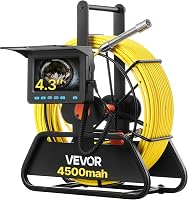
The VEVOR 98 ft model has a 4.3-inch color display, cable distance markings, six adjustable LEDs and a 16GB card for photos and video. It does not have self-leveling or a locator.
Its stated cable guidance covers straight pipes from 30 to 100 mm and right-angle pipes from 50 to 100 mm. Check those limits against your route before choosing.
The Teslong 50 ft Dual-Lens Drain Camera shows forward and side views on a 4.3-inch display, with six LEDs on the front camera and one on the side camera. Its cable can have limited flexibility through tight 90° elbows and P-traps.
It includes a USB charging cable, hook, magnet and side mirror. A TF memory card is sold separately.
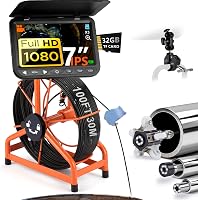
The ChoosePRO 7-Inch Sewer Camera includes a 100 ft marked cable, 7-inch screen, DVR and 32GB card. Its feature list also includes a 16× zoom and a reel that releases with a twist.
The camera head is IP68 rated, and the kit includes 25 mm and 84 mm sleeves. Check that the sleeves and camera head suit your pipe before use.
How do you inspect a sewer line with a camera?
A basic inspection needs a suitable access point, a clear plan and steady cable handling. Read the camera instructions first, then feed and retrieve the cable without forcing it.
- Find a suitable cleanout or other approved access point.
- Check the camera, cable, screen and power before feeding the probe.
- Start recording if you want to save the inspection.
- Feed the cable slowly while watching the screen and cable markings.
- Pause at changes in the image and note the cable distance.
- Retrieve the camera steadily, then clean and store it as the manufacturer directs.
Do not enter a confined space or remove a cap if you are unsure how to do so safely. A plumber can handle access or inspection conditions that are beyond your experience.
For a step-by-step walkthrough, read how to use a sewer camera on your own drain line. If you are considering doing the whole inspection yourself, see can you inspect your own sewer line with a camera?.
When should you call a plumber?
Call a plumber when the camera shows a concern you cannot identify, the cable becomes stuck or the line remains blocked. A professional can help interpret the footage and decide what inspection or repair should follow.
A camera view may reveal roots or visible pipe damage, but footage alone may not establish the full condition of the line. Our guide explains whether a sewer camera can show tree roots in your line.
Before buying a camera for a property purchase, consider whether a professional inspection is the better fit. See whether a sewer scope inspection is worth it before you buy.
Which sewer camera should you choose?
Choose a shorter dual-lens camera when your route is limited and a side view helps, or a longer cable when your measured route needs more reach. Pick a locator-equipped model when you need to estimate where the probe sits underground, and review the sewer camera options for home use to compare more models.
Frequently asked questions
What does a sewer camera show?
A sewer camera shows a live view inside a drain or sewer line, which can help you spot visible blockages, roots, cracks or other changes. The view depends on pipe access, water clarity, lighting and the camera head.
Video can help you share what you see with a plumber.
How long should a sewer camera cable be?
Choose a cable long enough to reach the section you need to inspect, with some allowance for the route from the access point. A longer cable does not guarantee the camera will pass bends or reach the problem.
Measure the route and review the cable's handling limits before choosing.
Do homeowners need a sewer camera locator?
A locator is useful when you need to estimate where the camera head is below ground, such as when marking a suspected problem spot. A camera without a locator can still show the pipe interior, but it cannot provide that above-ground position.
Compare your needs in our sewer camera locator guide.
Can a sewer camera pass through bends?
It depends on the camera cable, pipe diameter, bend shape and number of turns. Some camera systems have limits at tight elbows or traps, so check the manufacturer's guidance for your pipe route.
Do not force a cable that stops moving, since that can make retrieval harder.
Should I rent or buy a sewer camera?
Renting can make sense for a one-time inspection, while buying may suit repeated checks or regular maintenance work. Compare the rental period and included equipment with the camera features you actually need.
Our guide to renting or buying a sewer camera walks through that choice.