How to Use a Sewer Camera on Your Own Drain Line
To use a sewer camera, feed its cable slowly through a suitable drain opening while watching the screen. Track the cable distance, record changes, and stop if the cable catches or the image is unclear.
On this page (9 sections)
- How do you use a sewer camera step by step?
- What should you check before starting?
- How do you choose a sewer camera for your job?
- How do you keep the image clear?
- What should you record during an inspection?
- How do you use a sewer camera with a locator?
- What common mistakes should you avoid?
- When should you stop and call a plumber?
- Which sewer camera should you choose?
A sewer camera lets you inspect a drain by feeding a camera head through an accessible opening while watching the screen. How to use a sewer camera safely comes down to choosing a suitable cable, moving it slowly, and keeping notes about what you see and how far the head travels.
Start with a clear path into the pipe, a powered monitor, and a clean lens. Feed only a short section at a time, pause to review changes, and retrieve the cable if it catches or the picture stops making sense.
How do you use a sewer camera step by step?
Set up the monitor, use a suitable access point, then feed the camera slowly while watching the screen. Short movements make it easier to connect changes in the image with the cable's progress.
- Read the camera instructions and check the power, display, and recording controls.
- Find a cleanout or other suitable opening with a direct path into the drain.
- Place the monitor and reel on stable ground where you can see the screen safely.
- Feed the camera head into the line and advance the cable in short sections.
- Pause when the picture changes, and record anything you may need to review.
- Note the cable distance and direction, then retrieve it steadily.
If someone can help, one person can manage the cable while the other watches the monitor and takes notes. When working alone, stabilize the reel and avoid walking backward while looking down at the screen.
What should you check before starting?
Check the camera head, cable, lens, display, power, and access point before you feed the cable. A working image at the start helps you notice if the camera loses power or visibility later.
Set the monitor and reel in a dry, well-lit area. Keep cords and equipment away from standing water, and follow the camera instructions for use around moisture.
Look over the cable and camera head for visible damage, then make sure the lens is clean. Confirm that the display shows a usable image before putting the head into the drain.
Use an opening that gives the head a direct route into the pipe. If opening it could release wastewater, or you're unsure how to access it safely, contact a plumber.
How do you choose a sewer camera for your job?
Choose a camera based on the route, cable reach, screen, and whether you need to locate the head from above ground. A longer cable isn't automatically more useful if the pipe has tight turns or your inspection is limited to a short section.
For straighter drain sections and a shorter reach, the Teslong has a 50 ft cable and displays forward and side views together. Its cable has limited flexibility through tight 90-degree elbows and P-traps, so skip it for routes where those turns are likely.
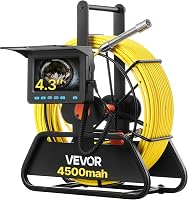
The VEVOR 98 ft camera suits a longer inspection where distance markings and a built-in screen are useful. It doesn't have self-leveling or a locator, so choose another model if you need the picture oriented automatically or need to find the camera head underground.
Choose the ChoosePRO if you want a larger 7-inch screen, video recording, and 16× zoom. Its 100 ft marked cable supports longer inspections; skip it if your main need is locating the head from above ground.
The VEVOR 165 ft model is the clear choice when locating the camera head matters, because it includes a 512 Hz transmitter and receiver. Its longer reach suits larger inspection jobs, but skip it if you only need to view a short, accessible section.
For more detail on cable reach, see how long a sewer camera cable should be. If you are still deciding whether to do the work yourself, read how to inspect your own sewer line.
How do you use a sewer camera around bends?
Slow down at bends and stop if the cable binds. A camera's ability to pass depends on the pipe size and the shape of the route.
The VEVOR 98 ft camera's guidance supports one 90-degree bend in pipes 50–100 mm wide and says it can pass two consecutive bends. That guidance doesn't guarantee passage through every drain layout.
The Teslong is intended for straighter PVC sections and has limited flexibility through tight elbows and P-traps. Don't force either camera through a turn it can't pass; retrieve it and reassess the route or call a plumber.
How do you keep the image clear?
Watch the screen in short sections and adjust the lights if the image is too dark or washed out. Move slowly enough to see changes in the pipe rather than rushing past them.
Water, dirt, and contact between the lens and pipe wall can obscure the view. If the picture becomes cloudy, retrieve the camera and clean the lens according to its instructions before trying again.
The ChoosePRO's zoom can enlarge visible details, but it can't restore information the camera didn't capture. Record unclear sections and review them after retrieving the camera.
Murky water can also reduce visibility. If the drain can be flushed safely, clearing it before inspection may give you a better view.
What should you record during an inspection?
Save useful footage and note the access point, cable distance, direction, and any changes on screen. These notes give a plumber context without treating a camera view as a final diagnosis.
Mark the approximate cable length when you reach something worth reviewing. Note whether you were feeding or retrieving the cable, because the same object can look different from each direction.
The ChoosePRO records video and includes a 32 GB card. The VEVOR 98 ft camera supports video and photo capture and includes a 16 GB card.
Keep the original footage, including the moments before and after a concern appears. If you share it with a plumber, include your distance notes and the opening you used.
How do you use a sewer camera with a locator?
Use a locator when you need help estimating where the camera head is underground. The camera needs a compatible transmitter, and a receiver tracks its signal from above ground.
The VEVOR 165 ft model includes a 512 Hz transmitter in its camera head and a 512 Hz receiver. Cable marks can help estimate the distance fed into the pipe, while the locator helps track the head's position above ground.
Those readings describe different things, so keep both in your notes. For an explanation of the receiver, see what a sewer camera locator does, or compare sewer cameras with and without a locator.
What common mistakes should you avoid?
Avoid forcing the cable, feeding it faster than you can read the image, or treating cable distance as an exact underground location. Each mistake can make the footage harder to interpret or increase the chance of a stuck cable.
- Don't push harder when the cable meets firm resistance. Ease it back and retrieve it if it won't move.
- Don't assume a cable will pass every bend just because it can handle some bends.
- Don't ignore a dark, frozen, or cloudy image. Stop and check the camera before continuing.
- Don't mistake distance marks for a locator reading. Marks estimate cable length; a locator tracks a compatible transmitter.
- Don't treat a visible crack, obstruction, or standing water as a complete diagnosis. Keep the footage and ask a plumber if the finding could affect a repair.
If the screen goes dark or loses signal, stop advancing the cable and check the power and connections as the instructions direct. See how to fix a VEVOR sewer camera with no signal for common screen and signal problems.
When should you stop and call a plumber?
Stop if the cable catches, wastewater may spill, or the image shows damage you can't assess. A camera shows what is visible inside the line; it doesn't repair the pipe.
Call a plumber if the cable won't move freely, the line appears collapsed, or a blockage stops the camera. Don't use force to reach a suspected problem.
If you can retrieve the camera safely, save the footage and note the access point, direction, and approximate cable distance. A professional can use those details to decide whether another inspection or repair is needed.
Which sewer camera should you choose?
Choose the camera that fits the pipe route and the decision you need to make. A short, straight inspection has different needs from a long run where you must locate the camera head.
Choose the Teslong for a shorter reach and split-screen views in straighter sections. Pick the VEVOR 98 ft camera for a longer marked cable, the ChoosePRO for its larger screen and recording features, or the VEVOR 165 ft model when its locator is important.
If access is uncertain or the route has tight bends, get a plumber's advice before feeding a camera into the line. Use the footage and distance notes to explain what you saw, and stop when the cable binds or the image is unclear.
Frequently asked questions
Can I use a sewer camera myself?
Yes, you can use a sewer camera yourself if you have a suitable access point, can handle the cable safely, and can make sense of the screen. Start with an accessible section and follow the camera instructions.
Stop if the cable binds, the line appears badly blocked, or you can't interpret the image.
A plumber can assess uncertain findings.
Where do you put a sewer camera in a drain?
Feed the camera through a suitable cleanout or service opening that gives it a direct path into the drain. The right entry point depends on the plumbing layout.
Don't remove a toilet or open a fitting unless you know how to do so safely and can restore it correctly.
Ask a plumber if you're unsure.
How far can a sewer camera go?
A camera can travel only as far as its cable and the pipe route allow. Cable markings help estimate how much cable has entered, but they don't confirm the camera's position underground.
Tight bends, obstructions, and pipe size can stop progress before the cable reaches its full length.
Can a sewer camera find a leak?
A sewer camera can show visible conditions such as a crack, obstruction, or standing water, but the image alone may not confirm a leak's source or severity. Record the footage and note the access point and cable distance.
A plumber can interpret the result and recommend any further inspection or repair.