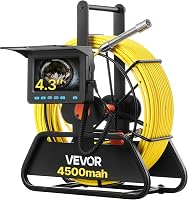
VEVOR Sewer Camera No Signal? Easy Fixes to Try
If your VEVOR sewer camera has no signal, charge it, restart it, and check the connections and screen input. If the image stays blank or blue, troubleshoot above ground before choosing a replacement.
On this page (9 sections)
- What should you check first when a VEVOR sewer camera has no signal?
- Why does a VEVOR sewer camera screen turn blue?
- What should you do if the camera lights aren't working?
- How can you tell if the cable or camera head is the problem?
- When is a VEVOR sewer camera with a locator the better choice?
- How should you set up a VEVOR camera before an inspection?
- What mistakes can make a no-signal problem harder to solve?
- How can you reduce interruptions and care for the camera?
- What is the decision rule for a VEVOR sewer camera with no signal?
If your VEVOR sewer camera has no signal, check power, connections, and the screen input before suspecting a failed camera. Restart the monitor and verify that a live image appears before feeding the probe into a drain.
A blank, blue, frozen, or intermittent display can have several causes. Work through the checks below in order, then use cable reach, self-leveling, and locator needs to choose a replacement if the problem remains.
What should you check first when a VEVOR sewer camera has no signal?
Charge the unit, reconnect the camera and monitor, and confirm the correct screen input. A loose plug or low battery can interrupt an inspection just as a damaged component can.
- Turn the unit off.
- Check the battery and recharge it if needed.
- Disconnect and reconnect the camera and monitor cables, seating each connector without forcing it.
- Turn the unit on and give the display a moment to start.
- Select the correct input or camera view if your model offers more than one.
Use the startup steps in your model's manual because controls and connections vary. If the image returns, move the probe gently above ground and confirm the picture responds before you continue.
Once the screen is stable, follow how to use a sewer camera on your own drain line to prepare for the inspection. Keep the probe out of the pipe until you can see what it is doing.
Why does a VEVOR sewer camera screen turn blue?
A blue screen means the monitor isn't displaying a usable camera image, but it doesn't identify the cause by itself. Check power and connectors before deciding that the probe is damaged.
Power the system down before reconnecting plugs. Look for dirt, moisture, bent pins, or a connector that isn't seated flush, and don't force a plug into place.
Restart the camera and monitor, then check the image above ground. If the screen stays blue, follow the troubleshooting steps in the manual and contact VEVOR support if they don't resolve it.
Don't push the camera into a drain without a live picture. You need the image to guide the probe and judge what it contacts.
What should you do if the camera lights aren't working?
Check the light controls and brightness setting after confirming the system is powered. A dark picture may result from a setting or connection problem, or from an issue at the camera head.
Adjust brightness using the controls in your manual. The VEVOR models covered here have adjustable LEDs, but the number of lights and control steps differ by model.
Wipe the lens with a soft, clean cloth and remove visible debris around the camera head. Don't pry open the head or scrape the lens with a sharp tool.
If the picture remains dark at every available setting, stop the inspection and ask VEVOR support for help. For a broader look at DIY inspection limits, see how to inspect your own sewer line.
How can you tell if the cable or camera head is the problem?
Inspect the cable, connectors, and lens above ground before feeding the probe into a pipe. Cuts, crushed spots, kinks, moisture, or a dirty lens can affect the picture or make it hard to read.
Uncoil a short section of cable and look for exposed wires or damage. Check the connectors and lens without opening sealed parts, then test the camera while the cable is still easy to reach.
Don't sharply bend the cable or pull it by a connector. If the image cuts out when the cable moves gently, or you see damage, stop using the camera and contact VEVOR support.
If you're considering a replacement, start with the distance you need to inspect. How long a sewer camera cable should be explains how to estimate useful reach.
Which VEVOR sewer camera should you choose if there is no signal?
Choose by reach, image orientation, and whether you need to locate the probe underground. These features can help match a replacement to the job, but none of them fixes a camera that still has no signal.
The 98 ft VEVOR Sewer Camera suits shorter inspections where a 4.3 in screen, recording, and basic camera view are enough. It has 6 adjustable LEDs, but it does not self-level or include a 512 Hz transmitter and locator receiver.
Skip this model if your work depends on an upright image as the probe turns or on tracking the camera head from above ground. The 98 ft self-leveling model addresses image orientation, not signal loss.
The VEVOR 98 ft Self-Leveling Sewer Camera suits users who want the picture to stay upright as the probe rotates. It has 12 adjustable LEDs and a 4.3 in screen, but no built-in 512 Hz transmitter or locator receiver.
For comparison with another brand, see Anysun vs VEVOR sewer cameras. A self-leveling camera can make orientation easier to read, but it won't restore a blank display.
When is a VEVOR sewer camera with a locator the better choice?
Pick the 165 ft VEVOR model when you need longer reach and a way to track the probe underground. It includes a built-in 512 Hz transmitter and locator receiver, along with a 9 in screen and 165 ft cable.
This model doesn't self-level, so the image can rotate with the probe. Skip it if upright orientation matters more than locating the probe or if your inspection doesn't need its longer cable.
If you need more reach but don't need a locator, the VEVOR 164 ft model offers a 4.3 in display, 6 adjustable LEDs, and a 164 ft cable. It doesn't self-level and doesn't include a 512 Hz transmitter or receiver.
Compare the locator option with the VEVOR 165 ft Sewer Camera With Locator review before deciding which features matter for your jobs. A longer cable won't solve a signal problem, so confirm any replacement displays a stable image before use.
How should you set up a VEVOR camera before an inspection?
Charge the battery, check the connections, and confirm the live image and lights before lowering the probe. A short above-ground check can catch problems while the camera is easy to reach.
Uncoil only the cable you need and keep it laid out without sharp bends. Set the screen where you can see it, then adjust the lights for a clear view without washing out the image.
Feed the cable steadily and keep track of its markings where available. If the picture drops, stop feeding cable and bring the probe back to an accessible point before troubleshooting.
What mistakes can make a no-signal problem harder to solve?
Continuing to push cable with a blank or unstable display is the mistake to avoid. You lose the visual guidance needed to steer the probe and could make recovery harder.
Don't force connectors, twist the cable sharply, or open the sealed camera head. Those actions can add damage or complicate support.
Don't assume that a longer cable, more LEDs, self-leveling, or a locator will solve a display fault. Each helps with a different inspection need, while signal loss calls for checking power, connections, and the camera system itself.
How can you reduce interruptions and care for the camera?
Keep the lens and connectors clean, protect the cable from tight bends, and check the picture before each use. These habits make it easier to spot a problem before the probe enters the line.
After an inspection, wipe the lens with a soft cloth and let wet parts dry as directed in the manual. Wind the cable loosely on its reel and store the unit so connectors are protected from dirt and moisture.
If the signal drops during a job, stop feeding cable and retrieve the probe to a safe, accessible point. Use the VEVOR 98 ft Sewer Camera review to compare that model's features if you're weighing a replacement.
What is the decision rule for a VEVOR sewer camera with no signal?
For a VEVOR sewer camera with no signal, charge it, restart it, reseat the connections, and verify the screen input before troubleshooting further. If the image stays blank, blue, or unstable, stop the inspection and contact VEVOR support.
If you need a replacement, pick the 98 ft model for shorter basic inspections, the 98 ft self-leveling model for upright viewing, the 164 ft model for extra reach without a locator, or the 165 ft model when you need to locate the probe. For broader options, compare sewer cameras for home use.
Frequently asked questions
Why does my VEVOR sewer camera have no signal?
A blank or blue screen can come from a low battery, a loose connection, an incorrect input, or a problem at the camera head or cable. Charge the unit, restart it, and reconnect each plug firmly.
If the screen still shows no image, stop using the camera and contact VEVOR support for model-specific instructions.
What should I do if my VEVOR sewer camera screen is blue?
A blue screen means the monitor isn't showing a usable camera image, but it doesn't identify the cause by itself. Check the power level and connections, then restart the monitor and camera according to the manual.
Keep the probe out of the pipe until you can confirm that the image is live.
Why are the lights on my VEVOR sewer camera not working?
First confirm the camera is powered and that the monitor can display an image, since some controls depend on the system being on. Check the light setting and brightness controls in your manual, then inspect the camera head for debris or damage.
Don't open the sealed camera head; ask VEVOR support if the lights remain off.