Can You Inspect Your Own Sewer Line With a Camera?
Yes, you can inspect your own sewer line with a camera if you have a suitable pipe camera and a reachable cleanout. Move the cable slowly, record what you see, and call a plumber if you find damage or can't interpret the image.
On this page (7 sections)
- Can you inspect your own sewer line with a camera?
- What do you need for a DIY sewer camera inspection?
- How do you inspect a sewer line yourself?
- What can a sewer camera show you?
- What can a DIY inspection not tell you?
- Should you rent or buy a sewer camera for one inspection?
- Is a DIY sewer camera inspection right for you?
Yes, you can inspect your own sewer line with a camera if you have a suitable pipe camera and a reachable cleanout. Move the cable slowly, save the video, and treat the view as a clue rather than a full diagnosis.
A DIY sewer camera inspection can help you see visible buildup, roots, standing water, or damage. Results depend on access, pipe layout, camera movement, and how clearly you can interpret the image.
Can you inspect your own sewer line with a camera?
You can inspect a sewer line yourself when you can reach it through a suitable access point and operate the camera carefully. A camera with its own screen and a push cable is made for this kind of work.
Find the cleanout before choosing equipment. A handheld borescope may suit a short, accessible drain, but a sewer line may call for a longer cable and a camera system designed for pipes.
Our plain sewer camera buying guide explains the main differences.
A camera shows only what its lens can see as it moves through the pipe. It may not reveal a problem around a bend, behind debris, or beyond the cable's reach.
What do you need for a DIY sewer camera inspection?
You need a pipe camera, an accessible cleanout, and a way to record or note what you see. Gloves and a work area that can get dirty also make the job easier to manage.
Choose a camera based on the access point, pipe path, and distance you need to cover. Cable length alone doesn't determine whether a camera can reach a spot: bends and cable stiffness affect how it moves.
See how long a sewer camera cable should be before deciding how much reach you need.
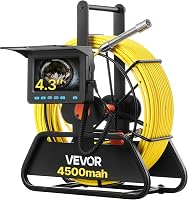
The VEVOR 98 ft Sewer Camera has a 4.3-inch screen, six adjustable LEDs, and a 16GB card for recording. It doesn't include a locating transmitter or receiver, so it can't mark the camera head's position above ground.
The VISIOPROBE 100 ft Sewer Camera has a 4.3-inch monitor and a 23 mm camera head. It has 12 adjustable LEDs and a 145° viewing angle.
The VEVOR 164 ft Sewer Camera includes a 4.3-inch screen, six adjustable LEDs, and a 16GB card. It does not have a built-in 512 Hz transmitter or include a locator receiver.
The DEPSTECH 50 ft Triple-Lens Camera, 5-Inch Screen offers front and side views and includes a 32GB memory card. Its 7.9 mm camera has an IP67 waterproof rating.
How do you inspect a sewer line yourself?
Feed the camera slowly through a confirmed access point while watching the screen and noting cable distance. Stop if the cable binds, the view becomes unclear, or you meet resistance you can't safely manage.
- Identify the cleanout and clear the work area.
- Set up the camera and confirm that the screen and lights work.
- Open the cleanout carefully, following any relevant equipment instructions.
- Feed the camera in small increments without forcing the cable.
- Pause to record visible changes and the cable distance.
- Withdraw the camera slowly and clean it according to its instructions.
Keep the cable under control as you feed and retrieve it. Avoid sudden pushes or pulls, which can make the camera harder to guide and the footage harder to interpret.
Our guide to using a sewer camera on your own drain line covers cable handling and inspection steps in more detail. Follow the camera's instructions, and stop if access or pipe conditions make the job unsafe.
What can a sewer camera show you?
A sewer camera can show visible conditions in the portion of the pipe it reaches. You may see roots, buildup, a break, standing water, or a change in the pipe, but the image may not show the full extent or cause.
A dark, blurry, or obstructed view isn't proof that the pipe is clear. Pause and check whether the lens needs cleaning or the lighting needs adjustment, then continue only if the camera can move freely.
Can a sewer camera show tree roots?
It can show roots that are in the camera's view. The camera may also reveal where the image becomes blocked, but that alone doesn't confirm how far the roots extend.
For examples of what roots may look like and what the camera can reveal, read can a sewer camera show tree roots in your line?. Ask a plumber to confirm what repair, if any, is appropriate.
What can a DIY inspection not tell you?
A camera view is not the same as a professional diagnosis or repair plan. You may not be able to tell the material, severity, or exact location of a suspected problem from the screen alone.
A camera without a compatible locator can't show you where the head is from above ground. Learn what a sewer camera locator does if identifying a spot under a yard or floor is part of your goal.
Stop and call a plumber if the camera gets stuck, the line won't drain, you see a major break, or the footage remains unclear. Avoid making repair decisions from a single uncertain image.
Should you rent or buy a sewer camera for one inspection?
Renting can make sense for a one-time inspection, while buying may suit repeated use. Compare the camera's cable length, access needs, and any locator requirement before choosing.
A rental may give you a camera for a specific job without storing equipment afterward. Buying may be more practical if you expect to inspect different lines over time and are prepared to learn how to use the equipment.
Use our sewer camera rental or buy guide to weigh those tradeoffs. For a pre-purchase inspection, also see whether a sewer scope inspection is worth it.
Is a DIY sewer camera inspection right for you?
For a DIY sewer camera inspection, use your own camera when the cleanout is accessible, the route is manageable, and you only need a visual check. Call a plumber for a stuck cable, unclear footage, suspected damage, or a finding that needs repair.
Choose a camera with enough cable for the route and a screen you can read while working. If you need to locate a problem above ground, confirm that the camera system supports a compatible locator before you begin.
Frequently asked questions
Can I inspect my sewer line myself?
Yes, you can inspect a reachable sewer line yourself with a pipe camera, a suitable cleanout, and care while feeding the cable. A camera can show visible conditions, but the image may not reveal the full cause or extent of a problem.
Ask a plumber to assess damage or uncertain findings.
Where do I put a sewer camera?
A sewer camera usually enters through an accessible cleanout, which provides a route into the drain line. Locate the cleanout and confirm that it is the right access point before opening it.
If you cannot identify it or the cap is stuck, ask a plumber rather than forcing it.
Can a sewer camera find a blockage?
A sewer camera can show material or an obstruction that is visible in the camera's path. Water, debris, bends, and a dirty lens can limit the view, so the image may not explain the whole blockage.
A plumber can clear the line and inspect it again if needed.
Do I need a locator with a sewer camera?
No, a locator isn't required just to view the inside of a line. It helps identify the camera head's position from above ground, which can be useful when you need to mark a suspected problem's location.
Check that both the camera and receiver support the same locating system.