Anysun vs VEVOR Sewer Camera: Which Is Better? (October 2026)
For the Anysun vs VEVOR sewer camera choice, pick Anysun for its 9-inch IPS screen and stated runtime up to 10 hours, the 165 ft VEVOR for 36x zoom, or the 98 ft VEVOR for shorter runs. Match the cable to your access point and likely inspection route.
On this page (11 sections)
- Anysun vs VEVOR sewer camera: what are the main differences?
- Which camera suits the inspection length?
- How do their screens and zoom compare?
- What recording and storage features do they offer?
- How should battery runtime affect your choice?
- How do you choose between the Anysun and VEVOR models?
- What should you check before setting up a sewer camera?
- How can you avoid common inspection mistakes?
- How should you care for the camera and cable?
- Does either camera include a locator?
- Which Anysun or VEVOR sewer camera should you choose?
For the Anysun vs VEVOR sewer camera choice, start with cable reach and work time, then compare the display and zoom. Anysun offers a 9-inch IPS screen and a stated runtime of up to 10 hours; the 165 ft VEVOR pairs a 9-inch screen with 36x digital zoom; the 98 ft VEVOR suits shorter runs.
The Anysun and 165 ft VEVOR share a 165 ft cable, self-leveling view, 9-inch display and 32GB card. Their main differences are stated battery runtime and digital zoom.
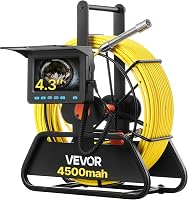
The smaller VEVOR trades reach and screen area for a 98 ft cable and compact 4.3-inch display.
For a wider overview of cable, camera head and screen choices, see our sewer camera buying guide.


Anysun vs VEVOR sewer camera: what are the main differences?
Anysun emphasizes a larger IPS screen and longer stated runtime, while the 165 ft VEVOR offers much higher digital zoom. The 98 ft VEVOR is the shorter-reach option with a smaller screen.
The Anysun has a 9-inch 1080P IPS display, a 5100mAh battery and up to 5x digital zoom. It includes a 32GB card for video recording and image capture, and supports cards up to 128GB.
The 165 ft VEVOR has a 9-inch 1080P HD display, a 4500mAh battery and 36x digital zoom. It includes a 32GB SD card for recording video and capturing images.
The 98 ft VEVOR has a 4.3-inch 1080P HD display, a 4500mAh battery and a 16GB card. Its shorter cable and smaller screen make it a more compact choice for inspections that do not call for the longer models' reach.
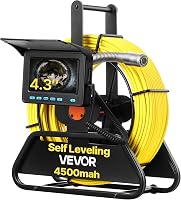
Self-leveling keeps the displayed view upright as the camera head turns. All 3 models include that feature, so the decision comes down to the job's likely distance, how you want to view the feed and whether you need to save footage.
Which camera suits the inspection length?
Choose a 165 ft model when your expected route may require more reach, and choose the 98 ft VEVOR when its shorter cable is enough. No cable length guarantees that the camera will pass every bend or obstruction.
The Anysun and 165 ft VEVOR have length markings to help estimate how far the camera has traveled. The 98 ft VEVOR is marked every foot, giving you a reference during a shorter inspection.
Before choosing, measure from the access point along the route you need to inspect. Allow for the cable path inside the pipe, entry bends and the amount of cable needed outside the opening for handling.
A longer cable can be useful for a long run, but it can be harder to manage when only a short section is needed.
For help estimating reach, see how long a sewer camera cable should be. If you plan to inspect your own line, our guide to using a sewer camera covers preparation and handling.
How do their screens and zoom compare?
The Anysun and 165 ft VEVOR have 9-inch displays, while the 98 ft VEVOR has a 4.3-inch screen. The 165 ft VEVOR has the highest stated digital zoom at 36x.
The Anysun's 9-inch IPS screen is suited to users who want more viewing area, and its digital zoom goes up to 5x. The 165 ft VEVOR keeps the same screen size but raises digital zoom to 36x.
The 98 ft VEVOR's 4.3-inch display can suit a smaller work area or a setup where portability matters more than a large viewing surface. If several people need to view the feed at once, a larger screen can be easier to share.
Digital zoom enlarges the view on screen; it does not add detail captured by the camera. Choose it when magnifying a displayed area is useful, but don't treat a high zoom number as a substitute for the camera's underlying image quality.
What recording and storage features do they offer?
All 3 cameras support image or video capture and include an SD card. Anysun and the 165 ft VEVOR include 32GB cards, while the 98 ft VEVOR includes a 16GB card.
The Anysun supports one-touch video recording and image capture, with playback from its card. It also supports cards up to 128GB and saving footage from the SD card to a PC.
The 165 ft VEVOR records HD video and captures images to its included card. The 98 ft VEVOR also supports real-time video recording and photo capture.
If you plan to document a long inspection, decide before starting how you will organize clips and images. Use clear file names after transferring them, and capture a reference point such as the access location before recording details farther down the line.
How should battery runtime affect your choice?
Anysun states up to 10 hours of runtime, the 165 ft VEVOR states 6–8 hours, and the 98 ft VEVOR states 4–5 hours. These figures help compare intended work sessions, but actual time can vary.
The Anysun has a 5100mAh battery. Both VEVOR cameras have 4500mAh batteries, though their stated runtimes differ.
For a short inspection, the 98 ft model's stated runtime may be sufficient. For a long workday or multiple inspections, the Anysun's longer stated runtime may be appealing, while the 165 ft VEVOR balances long cable reach with a shorter runtime claim.
Charge the system before an inspection and check the battery indicator where available. Avoid planning a job around the maximum stated time alone, especially if you expect pauses, repeated recording or a long cable run.
How do you choose between the Anysun and VEVOR models?
Pick the model that fits your route and working style: Anysun for screen size and stated runtime, 165 ft VEVOR for high digital zoom, or 98 ft VEVOR for shorter lines. Don't pay attention to a single headline feature until you know the access point, expected distance and need to save footage.
Choose the Anysun for longer stated runtime
The Anysun combines a 9-inch IPS display with a 165 ft marked cable, 32GB card and stated runtime up to 10 hours. Its IP68 camera has 12 adjustable LEDs, and the system supports one-touch recording and image capture.
This is the clearest fit if you want a large screen and a longer stated work window. Skip it if 36x digital zoom is a deciding need, or if you require a confirmed locator package, because the available details do not clarify which locator parts are included.
Choose the 165 ft VEVOR for magnification
The 165 ft VEVOR pairs a 9-inch 1080P HD display with a length-marked cable, 32GB card and 36x digital zoom. Its stated battery runtime is 6–8 hours.
Choose it if you want long cable reach and more on-screen magnification than Anysun provides. Skip it if your likely route is short and a smaller setup is more practical, or if the longer stated runtime is a priority.
For a closer look at this model, read our VEVOR 165 ft sewer camera review.
Choose the 98 ft VEVOR for shorter reach
The shorter VEVOR has a 98 ft cable marked every foot, a 4.3-inch screen and a 16GB card. Its stated runtime is 4–5 hours.
This is the practical pick if the line you need to inspect is within its reach and a compact display works for you. Skip it for routes that may exceed 98 ft, jobs where a large screen is important, or work that requires a locator.
The 98 ft model does not include a 512 Hz locator receiver, and its camera head has no built-in 512 Hz transmitter. If locating matters, compare options in our guide to sewer cameras with or without a locator.
What should you check before setting up a sewer camera?
Plan the route, access and recording needs before feeding cable into the line. A few minutes of preparation can reduce cable strain and make the footage easier to interpret later.
First, identify the access point and estimate the distance to the section you need to see. Check whether the route includes tight turns, a change in pipe diameter or a known obstruction that may limit how far the camera head can travel.
Set the monitor where you can see it without pulling the cable at an awkward angle. Confirm the battery has charge, the SD card is in place and recording controls are ready before you begin.
Adjust the camera lights as the image changes inside the pipe. Move the cable forward in controlled increments, watch the monitor and retrieve it if the head stops moving instead of forcing it around a bend.
How can you avoid common inspection mistakes?
Use the cable marks as an estimate, move steadily and treat digital zoom as a viewing aid. These habits help you get useful footage without assuming the camera can pass every feature of a line.
A common mistake is buying the longest cable available without considering storage and handling. Longer reach is helpful only when the route needs it, and excess cable still has to be fed, tracked and retrieved.
Another mistake is forcing the cable when the head meets resistance. Stop, ease the cable back and reassess the route; pushing harder can make handling more difficult and may put unnecessary strain on the cable.
Don't infer exact distance from cable markings alone. They indicate how much cable has entered, not the camera head's position on a property map, especially when the route bends.
Finally, don't rely on zoom to make a poor or poorly lit view clear. Adjust the LEDs and camera position first, then use magnification to inspect an area on the monitor.
How should you care for the camera and cable?
Clean and dry the camera head after use, and handle the cable in a way that avoids sharp kinks. Anysun specifically advises rinsing the camera head with water and drying it after use in corrosive liquid, then wiping the camera dry after each inspection.
Follow the instructions for the exact system when cleaning the screen, reel and cable. Keep the camera head protected during storage, and avoid winding or pulling the cable in a way that creates a tight bend.
Review recordings before putting the system away if you need to share them with a plumber or keep a record. Copy important files from the SD card to a computer so they remain available for later reference.
Does either camera include a locator?
The 98 ft VEVOR does not include a 512 Hz locator receiver, and its camera head has no built-in 512 Hz transmitter. Anysun's product description mentions a locator and 512Hz sonde, but it does not clarify what comes with this model.
The available details for the 165 ft VEVOR do not confirm a locator or sonde. If you need to find the camera head's position from above ground, confirm that the exact system includes a compatible transmitter and receiver.
A screen shows what's inside a pipe, while a locator helps estimate where the camera head is underground. Our guide to what a sewer camera locator does explains the difference.
Which Anysun or VEVOR sewer camera should you choose?
For the Anysun vs VEVOR sewer camera decision, choose Anysun for its 9-inch IPS screen and longest stated runtime, the 165 ft VEVOR for 36x zoom, or the 98 ft VEVOR when its shorter cable meets your needs. Measure the route first, then weigh screen size, recording and locator requirements.
If you still need to compare self-leveling options, see our best self-leveling sewer cameras guide. If locating underground is part of the job, choose only after confirming that the required transmitter and receiver are included.
Frequently asked questions
Is Anysun or VEVOR better for a sewer camera?
For the Anysun vs VEVOR sewer camera choice, pick Anysun for its 9-inch IPS screen and stated runtime up to 10 hours. The 165 ft VEVOR offers a 9-inch screen and 36x digital zoom, while the 98 ft VEVOR fits shorter runs.
Choose by cable reach, display size and the work session you expect.
Do the Anysun and 165 ft VEVOR have the same cable length?
Yes. Both the Anysun and the 165 ft VEVOR have length-marked cables, while the other VEVOR model has a 98 ft cable marked every foot.
Cable markings help estimate how much cable has entered the line.
Bends, pipe size and obstructions can limit usable reach.
Does the 98 ft VEVOR sewer camera have a locator?
The 98 ft VEVOR camera head does not have a built-in 512 Hz transmitter, and the system does not include a 512 Hz locator receiver. If locating the camera head from above ground matters, choose a system with a compatible transmitter and receiver, and confirm both are included.
Which VEVOR sewer camera has a bigger screen?
The 165 ft VEVOR has a 9-inch 1080P HD screen. The 98 ft model has a 4.3-inch 1080P HD screen, so it takes up less space and gives you less viewing area.
Choose the larger screen if you want to inspect the image on the monitor from a comfortable distance.