How Long Should a Sewer Camera Cable Be?
Choose a sewer camera cable length that reaches your inspection point with working slack. Many home checks fit a 50–100 ft cable, while longer routes may call for 164 or 200 ft.
On this page (9 sections)
- How do you choose sewer camera cable length for a home?
- How should you measure the route before buying?
- When is a 50 ft sewer camera cable enough?
- Is 98 ft a useful sewer camera cable length?
- When should you choose a 164 ft or 200 ft cable?
- What matters besides sewer camera cable length?
- How should you set up and feed the cable?
- What common cable-length mistakes should you avoid?
- Which sewer camera cable length should you choose?
Sewer camera cable length should cover the route to your inspection point, plus enough slack to feed and retrieve the cable comfortably. For many home checks, 50–100 ft is a useful range; longer lines may call for 164 or 200 ft.
Measure the route from the access opening to the farthest point you want to view, rather than using the length of your house or property. The route, pipe turns, access position, and cable stiffness all affect practical reach.
How do you choose sewer camera cable length for a home?
Start with the farthest point you need to inspect, then match the cable to the route and pipe. A 50–100 ft camera can suit many home checks, while a longer route may need more reach.
A 50 ft cable fits a short, direct inspection near an accessible cleanout. A 98 ft cable gives you more room for a longer run, and 164 or 200 ft options suit routes that exceed the shorter lengths.
Those numbers describe cable length, not guaranteed travel inside a pipe. Some cable stays outside the opening, and turns or obstructions can stop the camera before it reaches the target.
For an overview of camera types and other buying factors, see our sewer camera buying guide. If you already own a camera, our guide to using a sewer camera on your drain line covers preparation and cable handling.
How should you measure the route before buying?
Measure along the pipe path from the access opening to the farthest area you want to inspect. Add the distance from your hands or reel to the opening, plus working slack for feeding and retrieval.
Use a tape measure when the route is accessible. If not, estimate the line from plans, known pipe runs, or the distance to nearby fixtures and cleanouts.
A cable that reaches the target exactly on paper can be awkward to use. Extra slack gives you room to position the reel and work without pulling the cable taut at the opening.
If you cannot estimate the route with confidence and need a camera for one job, compare the costs and convenience of renting or buying a sewer camera.
Should you buy more sewer camera cable than you measured?
Buy enough to cover the expected route with comfortable working slack, but don’t choose the longest cable by default. Extra cable takes more room to feed, manage, and retrieve.
A longer cable also doesn’t solve a tight turn or a pipe that is too small for the camera head. Check the model’s pipe and bend guidance before paying for extra reach.
When is a 50 ft sewer camera cable enough?
A 50 ft cable can suit a short, direct inspection when the access point is close to the area you need to view. It may also be easier to manage for a targeted drain check than a much longer setup.
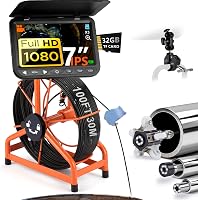
The Teslong 50 ft Dual-Lens Drain Camera has a semi-rigid cable and two views: one looks forward, while the other shows the pipe wall. Its cable is suited to straight PVC sections but has limited flexibility through tight 90-degree elbows and P-traps.
Choose this camera when the distance fits and the pipe route is fairly straight. Skip it if your target is beyond 50 ft or the route depends on tight turns that the cable may not pass.
Is 98 ft a useful sewer camera cable length?
A 98 ft cable is a middle-ground choice when 50 ft won’t cover your route but a longer camera would be more cable to manage than you need. Check the pipe diameter and bends as carefully as the distance.
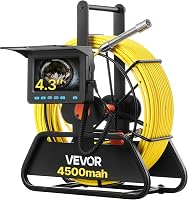
The VEVOR 98 ft Sewer Camera has distance markings on its semi-rigid fiberglass cable. Its guidance covers straight pipes from 30–100 mm and right-angle pipes from 50–100 mm; for a single 90-degree bend, the suitable diameter is 50–100 mm.
This option suits a route within its reach and pipe guidance. Skip it if your line needs a locator to find the camera head underground: this model has no built-in 512 Hz transmitter or locator receiver.
When should you choose a 164 ft or 200 ft cable?
Choose 164 or 200 ft when the route you expect to inspect needs more reach than a 98 ft cable provides. Long cables make sense for longer runs, but the camera still has to fit and pass through the pipe.
The VEVOR 164 ft Sewer Camera has cable distance markings to help track how much cable you have fed. Its guidance gives separate pipe-size ranges for straight and right-angle pipes, so check the fit against your route before choosing it.
The JQKJCAM 200 ft Sewer Camera has meter and foot marks on its semi-rigid cable. Its 17 mm camera head is described for pipes at least 1 in wide, with a guide wheel for pipes 3.5 in or larger.
The JQKJCAM suits a long route where its 17 mm head and cable setup fit the pipe. Skip a 164 or 200 ft camera if you only need to inspect a short section; the unused cable still needs to be managed and stored.
What matters besides sewer camera cable length?
Pipe fit and cable handling decide whether extra cable can become useful reach. Check the camera head size, pipe diameter, bend guidance, cable stiffness, and distance markings before buying.
A semi-rigid cable can push through some layouts but may struggle at tight bends or traps. A camera head that is too large for the pipe cannot pass through it, regardless of cable length.
Distance marks tell you how much cable has entered the pipe, but not the camera head’s exact underground position. If you need to locate the head from above, read how a sewer camera locator works and compare cameras with and without a locator.
How should you set up and feed the cable?
Set the reel near the access opening, clear a path for the cable, and feed it steadily while tracking its progress. Keep enough room to retrieve the cable without crossing walkways or catching it on nearby items.
Before starting, check that the camera fits the pipe and that your planned route is within the model’s bend guidance. If the line is murky, flushing it with clean water can improve visibility, as the Teslong guidance recommends.
Use cable markings as a rough measure of how much has entered the pipe. If the camera stops advancing, ease back and reassess the bend or obstruction rather than forcing the cable.
What common cable-length mistakes should you avoid?
The main mistake is treating the printed cable length as guaranteed inspection distance. Cable outside the pipe, route turns, and obstructions all reduce how much reaches the target.
Avoid buying by property size alone, assuming a long cable can pass every bend, or choosing a camera without checking pipe diameter. Also avoid feeding more cable than you need, since it can tangle or make retrieval harder.
If knowing the camera’s underground position matters, don’t assume cable markings act as a locator. Look for a model with locating equipment if you need to find the head from above ground.
Which sewer camera cable length should you choose?
Choose 50 ft for a short, direct route, about 98 ft for a longer run, and 164–200 ft only when your measured route calls for that reach. Then confirm that the camera head and cable suit the pipe’s size and bends.
A useful sewer camera cable length is the one that reaches your inspection area with working slack and can pass through your pipe layout. If you need to find the camera head underground, compare models with and without a locator before buying.
Frequently asked questions
Is a 100 ft sewer camera cable long enough?
A 100 ft cable can be enough when the inspection point is within reach of the access opening and the route is fairly direct. Measure along the pipe path, then allow for cable outside the opening and enough slack to feed and retrieve it comfortably.
Pipe turns and obstructions can limit how far the camera travels.
Is a longer sewer camera cable always better?
No. More cable adds reach, but it also means more cable to feed, manage, store, and retrieve.
Choose a length that covers your likely route with working slack.
Pipe diameter, turns, and cable stiffness still affect whether the camera can advance, so extra length cannot make an unsuitable route passable.
How do I measure the sewer camera cable I need?
Measure from the access point to the farthest area you want to inspect, following the pipe route as closely as possible. Include the distance from where you'll handle the cable or reel to the opening, then add enough slack to feed and retrieve the cable without pulling it tight.
Can a sewer camera cable get through a 90-degree bend?
It depends on the cable, camera head, pipe diameter, and bend. Extra cable does not guarantee that the camera will pass an elbow.
A semi-rigid cable can stop at a tight turn.
Check the model's pipe-size and bend guidance before starting, and stop if the cable binds.