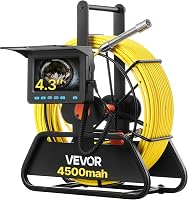
What Does a Sewer Camera Locator Do?
A sewer camera locator tracks a transmitter in the camera head from above ground, helping you find the head’s position along a buried pipe. Choose a system with a compatible receiver when you need to mark a point for repair planning.
On this page (7 sections)
- What does a sewer camera locator do?
- How does a sewer camera locator work?
- How do you use a sewer camera locator during an inspection?
- When is a sewer camera locator useful?
- How should you choose a sewer camera locator?
- What common sewer camera locator mistakes should you avoid?
- Which sewer camera locator should you choose?
A sewer camera locator tracks a transmitter in the camera head from above ground, helping you find the head’s position along a buried pipe. The camera shows what is inside the pipe; the locator helps match an image on the screen to a spot on the surface.
A system usually has a transmitter in or near the camera head and a compatible receiver you move over the ground. Some camera kits include both parts, while others include a transmitter only, so check what you need before choosing.
What does a sewer camera locator do?
A sewer camera locator helps you trace the underground position of the camera head. If you see a concern on the monitor, the receiver can help you find the corresponding spot above ground.
The camera and locator have separate jobs. The camera provides a view inside the pipe, while the receiver follows the signal from the head.
A locator does not tell you whether the image shows roots, a joint, standing water, or a blockage. Use the video to assess what the camera faces, then use the receiver to help locate that point.
How does a sewer camera locator work?
A sewer camera locator detects a signal from a transmitter, often called a sonde, in or near the camera head. You move the receiver over the suspected pipe route and follow its signal to find the head.
Many systems use a 512 Hz signal. The transmitter and receiver need to be compatible, so check both before relying on a receiver you already own.
The signal marks the head’s current position. It does not show the whole pipe route ahead of the camera, and cable markings do not replace a receiver.
What does 512 Hz mean on a sewer camera locator?
A 512 Hz system uses a transmitter that sends a signal at that frequency and a receiver designed to detect it. The VEVOR 165 ft Sewer Camera With Locator has a built-in 512 Hz transmitter and includes a 512 Hz receiver.
Its marked cable helps estimate how much cable has entered the pipe, while the receiver helps trace the camera head above ground. This model is a fit if you want a long cable and an included locator kit, and do not need the image to stay upright: it is not self-leveling.
How do you use a sewer camera locator during an inspection?
Use the locator when the camera reaches a point you want to mark. Pause the camera there, then scan the ground above the suspected pipe route with the compatible receiver.
Move the receiver slowly across the area and follow its signal to identify the head’s position. Mark the location if you need to refer to it later, and take note of what the camera shows at that point.
Cable markings can help estimate how far the head has traveled inside the pipe. They do not show the head’s position above ground, so use the receiver for surface tracing.
For the camera inspection itself, see how to use a sewer camera.
Before starting, confirm that the receiver can detect the camera’s transmitter and that both units have power. Feed the cable at a controlled pace, watch the screen for the point you want to locate, and avoid assuming the head is directly below you until you have scanned the area.
When is a sewer camera locator useful?
A sewer camera locator is useful when you need to match a visible pipe concern to a location above ground. That position can help narrow the area for further inspection or repair planning.
It is especially helpful when the pipe runs under a yard, driveway, or another surface where searching without a location estimate could involve unnecessary digging. Treat the receiver’s guidance as a position estimate and confirm the pipe route before excavation.
For short, accessible drains where you only need to view the inside, you may not need a locator. Compare the tradeoffs in sewer cameras with or without a locator.
Can a locator tell you what is wrong with the pipe?
No. The camera image shows the inside condition, and the locator helps trace where the camera head is.
The receiver can help you return to a section for another look, but it cannot confirm the extent of damage or decide which repair is right. If you need to understand what the camera can reveal, see whether a sewer camera can show tree roots.
How should you choose a sewer camera locator?
Choose a system by checking receiver inclusion and compatibility first, then match cable reach and camera features to the work you expect to do. A longer cable is useful only when the pipe route requires it, and a self-leveling image is useful when upright orientation matters.
The VEVOR 165 ft Self-Leveling Camera With Locator suits longer inspections where you want both an included receiver and an upright image. Its cable markings are spaced at 3 ft intervals, and its screen is 9 inches with a 1080p display.
Choose this model when the reach and image orientation match your work. Skip it if you need less cable or do not need self-leveling; a shorter setup may be easier to justify for those jobs.
For a shorter reach, the VEVOR 98 ft Self-Leveling Camera With Locator also includes a 512 Hz transmitter and receiver. Its 98 ft cable has markings at 3 ft intervals, so it suits jobs where that reach is enough and you still want an upright view.
If you already have a compatible receiver, the ONDASHCAM 100 ft Self-Leveling Camera With Transmitter may suit you. Its built-in transmitter uses 512 Hz, but the receiver is not included, so skip this setup if you need a complete locator kit.
This ONDASHCAM camera has markings every 1 meter and a self-leveling image. If you need to buy a receiver separately, include that in your decision and confirm compatibility before relying on the setup.
For a broader look at camera styles, read the sewer camera buying guide. To estimate the reach you need, see how long a sewer camera cable should be.
What common sewer camera locator mistakes should you avoid?
The most common mistake is assuming that any receiver will work with any transmitter. Check the frequency and confirm whether the camera kit includes a receiver before you buy.
Also avoid treating cable length as a surface location. Markings show how much cable has been fed into the pipe, but bends and the pipe route affect where the camera head lies.
Do not read the locator signal as a diagnosis. Use the screen to inspect the pipe, then use the receiver to help find the corresponding place above ground.
After use, clean and dry the camera head and cable according to the system’s care instructions, and store the cable neatly on its reel or in its case if supplied. Keep the receiver and camera components together so you can check compatibility and charge or prepare the right equipment before the next inspection.
Which sewer camera locator should you choose?
Choose the VEVOR 165 ft Self-Leveling model if you need longer reach, an upright image, and an included receiver. Choose its 98 ft version if that reach is sufficient and you want the same locator and self-leveling combination in a shorter setup.
Choose the standard VEVOR 165 ft system if long reach and an included receiver matter more than an upright image. Choose the ONDASHCAM if you already have a compatible 512 Hz receiver and want a self-leveling camera with 100 ft of cable.
If you only inspect accessible drains and do not need to mark a buried point, a camera without a locator may be enough. Compare the best sewer cameras with a locator before choosing, and confirm receiver compatibility for any system you plan to pair.
Frequently asked questions
What does a sewer camera locator detect?
A sewer camera locator detects a signal from a transmitter, often called a sonde, built into or attached to a camera head. A compatible receiver reads that signal from above ground to help trace the head’s position as it moves through a pipe.
It helps locate the camera, while the camera view shows what is inside the pipe.
Does a sewer camera locator find a blockage?
A locator can help show where the camera head is when you see a blockage or other concern on the screen. The camera image shows the condition inside the pipe; the receiver helps estimate where that point lies underground.
The receiver cannot identify a blockage by signal alone.
Do sewer camera locators work with any camera?
No. The camera head must have a transmitter that sends a signal the receiver can detect, and the receiver must support that signal frequency.
Check both device specifications before buying or pairing equipment.
A camera without a compatible transmitter cannot be traced with a locator receiver.
Is a sewer camera locator the same as a cable length counter?
No. Cable markings or a counter estimate how much cable has been fed into the pipe, while a locator receiver tracks the signal from the transmitter in the camera head.
Cable length can help estimate distance along the pipe, but it does not show the head’s position above ground.