Should You Rent a Sewer Camera or Buy One?
Sewer camera rental suits a one-time inspection; buying makes more sense when you expect repeat use. Choose based on the line's reach, whether you need a locator, and whether you can handle the setup and care.
On this page (7 sections)
Sewer camera rental is usually the practical choice for one inspection; buying fits repeated use. The right option depends on how far the camera must travel, whether you need to mark a buried problem, and whether you can set up and care for the equipment.
A sewer camera uses a cable reel, camera head, and screen to show the inside of a drain line. Renting can avoid storing a large system, while owning gives you access for follow-up checks and other jobs.
When does sewer camera rental make sense?
Renting makes sense for a one-time inspection or a need you don't expect to repeat. It gives you temporary access without leaving a reel and screen in storage afterward.
A home purchase, one backup, or a repair check may call for a single inspection. If you're already hiring a plumber, ask whether the inspection and explanation are included in the service.
Before booking, confirm the rental period, pickup and return times, included accessories, and whether someone will show you the controls. Ask about responsibility for damage to the cable or camera head, and whether a locator comes with the system.
The cost of a rental is only part of the decision. If you're new to camera work or need a clear diagnosis for a repair, a professional may be better positioned to interpret the footage.
Our guide to whether a sewer scope inspection is worth it can help you weigh an inspection before buying a home. If you plan to handle the camera yourself, read how to use a sewer camera before booking equipment.
When is buying a sewer camera worth it?
Buying can suit you when repeat inspections or quick access are part of a real routine. It may be useful for ongoing property maintenance, plumbing work, or comparing a line's condition after a repair.
Base the decision on expected use, not on a vague possibility that the camera might come in handy. If you can't name the lines or jobs you'll inspect, renting is likely the simpler option.
Ownership also takes room and care. Measure the space for the reel and screen, consider how you'll transport the system, and plan to clean the cable and camera head after use.
Compare the full ownership cost with local rental and professional inspection options. Include any accessories you need, as well as the time it takes to learn cable handling and review footage.
What should you compare before renting or buying?
Start with pipe access, cable reach, locator needs, and your comfort with the equipment. A system that doesn't fit the job can be frustrating to rent and expensive to own.
How far must a sewer camera reach?
Choose a cable long enough for the line you intend to inspect, with room for the route to bend. Cable length alone doesn't guarantee that the camera can pass through every pipe or turn.
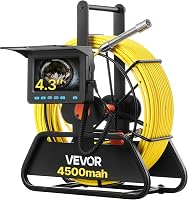
The VEVOR 98 ft Sewer Camera has a marked 98 ft cable, a 4.3 in screen, and a 16GB card for photos and video. Its camera doesn't self-level and the system doesn't include a locator.
This option suits someone who wants a more compact screen and expects the line to be accessible to its cable. Skip it if you need a locator.
Check the pipe diameter and bends before reserving or buying any system.
Do you need to locate a problem underground?
Choose a system with a locator when you need to trace the camera head's position from above ground. Video can show an issue inside the pipe, while a locator helps connect that view to a spot for repair work.
The VEVOR 165 ft Sewer Camera With Locator includes a 512 Hz transmitter in the camera head and a receiver that tracks it. Its cable is marked, and its 9 in screen is larger than the 98 ft VEVOR's.
This system fits longer inspections that may need a ground location. Skip it if your job only needs a short visual check.
Carrying and storing a 21.7 lb system may also be impractical. For more detail, see what a sewer camera locator does.
Would self-leveling make the view easier to use?
Self-leveling helps keep the picture upright as the camera head turns. That can make footage easier to follow when you inspect the line or share a recording with someone else.
The Anysun 9-Inch Self-Leveling Sewer Camera has a 9 in IPS screen, 1080p video capture, a 32GB card, and a 165 ft cable with meter markings. Its camera self-levels, which distinguishes it from the VEVOR models described here.
Choose it when you value upright footage and need the reach of a 165 ft cable. Skip it if you need a locator.
Product information is inconsistent: its title and feature details don't confirm a locator, while its description mentions one. Verify that capability before relying on it to mark a buried issue.
Do screen size and recording matter for your job?
A larger screen and saved footage help when you need to review or share findings later. If you only need a quick view and someone else will interpret it, those features may not decide whether to rent or buy.
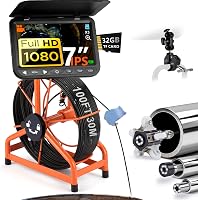
The ChoosePRO 7-Inch Sewer Camera has a 7 in IPS screen, 1080p video capture, a 32GB card, and a marked 100 ft cable. Its twist-lock reel helps control cable release, and it includes 25 mm and 84 mm sleeves.
This system fits someone who values a larger viewing area and recorded files. Skip it if the inspection needs a locator.
It also may not fit jobs requiring a cable longer than 100 ft. Its IP68-rated camera head is intended for wet pipe work, but the rest of the system still needs proper handling and care.
How do you set up and use a rented sewer camera?
Read the instructions, prepare the screen and reel, and confirm the route before feeding cable. A few checks can prevent a rushed inspection or damage to the equipment.
Before starting, identify the access point and the approximate length of pipe you want to inspect. Check the camera head, cable, screen, recording card, and any included sleeves or guides, then make sure the system has enough charge for the job.
Feed only as much cable as you need and keep the reel stable. Let the cable follow the pipe instead of forcing it through resistance; a tight bend or obstruction can stop progress and strain the equipment.
Watch the screen as you advance and note the cable markings when you see a concern. Record footage if the system supports it, and save the distance and location notes together so the view is useful later.
What mistakes should you avoid?
Don't treat a camera view as a complete diagnosis or force the cable when it catches. A visible change inside a pipe needs context, and pushing harder can put the line or equipment at risk.
One common mistake is choosing cable length without checking the route, pipe diameter, and bends. Another is assuming a camera has a locator because the screen shows a problem; the locator is a separate function that helps trace the head underground.
Don't rent more equipment than you can set up or use. If you can't identify the access point, control the cable, or interpret what appears on screen, ask a plumber to inspect the line or review the footage.
How should you care for a sewer camera?
Clean and dry the camera head and cable after use, then store the reel where it won't be crushed or sharply bent. Follow the system's instructions, especially after an inspection involving dirty or corrosive liquid.
For a rental, ask how the equipment should be cleaned before you return it and report any damage or operating issue. For an owned system, set aside a place for the reel and screen so the cable isn't left under weight or kinked between jobs.
Owning also means learning how to feed and retrieve the cable smoothly. Stop if it catches or resists rather than pulling hard; the plain sewer camera buying guide covers cable, screen, and feature choices for homeowners.
Should you rent or buy a sewer camera?
Rent for an isolated inspection; buy when repeat access solves a specific need. If you need to mark a buried issue, prioritize a system that includes a locator.
For a single home inspection or repair check, compare rental terms with a professional scope. For repeated maintenance, choose a cable length and screen that fit your lines, then plan for setup, cleaning, and storage.
If you expect to inspect the line yourself, read how to inspect a sewer line with a camera and decide whether you can interpret the footage. When you can't identify what you're seeing, ask a plumbing professional to inspect or review the line.
Frequently asked questions
Is sewer camera rental cheaper than buying?
For one inspection, renting often costs less overall because you avoid buying equipment that may sit unused. Buying can make sense when you expect repeat jobs or need the camera on short notice.
Compare local rental terms with the cost of ownership, including storage, cleaning, and any accessories you need.
How often should you use a sewer camera?
There is no single schedule for every home. Use a camera when there's a reason, such as recurring drain trouble, a property inspection, or a repair check.
If a professional recommends repeat inspections, ask what condition they are monitoring and how often another view could change your next step.
Can you use a sewer camera without a locator?
Yes. A camera can show the inside of a pipe without a locator.
The locator helps identify where the camera head is underground, which can matter when you need to mark a suspected problem for repair.
Read about what a sewer camera locator does before choosing a system.
Should a homeowner buy a sewer camera?
A homeowner may benefit from buying one if they expect several inspections and can feed, clean, and store the cable. For one concern or a home purchase, renting or hiring a professional may be simpler.
Match the equipment to the job, including pipe access and whether you need to locate a buried issue.