Can a Sewer Camera Show Tree Roots in Your Line?
Yes, a sewer camera can show tree roots that have entered a drain line. The camera may reveal fine strands, thicker growth, or a root mass, but the view alone may not show the full damage or where the pipe sits underground.
On this page (9 sections)
- Can a sewer camera see tree roots inside the pipe?
- What do tree roots look like on a sewer camera?
- How do you inspect a line for roots?
- Can a camera show where roots entered the pipe?
- Which camera features help when checking for roots?
- What should you do if the camera shows roots?
- Can a sewer camera see tree roots outside the pipe?
- How can you tell whether a root problem needs professional help?
- Can a sewer camera see tree roots well enough to act?
Yes, a sewer camera can show tree roots that have entered a drain line. It may reveal thin strands, branching growth, or a dense mass, but the camera view alone may not show the full extent of pipe damage or the roots outside it.
Roots often enter through a joint or a damaged section, then grow into the open space inside the pipe. A camera can help you inspect the interior and record what appears on screen.
Can a sewer camera see tree roots inside the pipe?
Yes, a sewer camera can show roots that have grown into the pipe. The lens can reveal root fibers or a clump that narrows the passage, as long as the camera reaches the area and the view is clear.
The image may show roots crossing the pipe, hanging from a joint, or filling part of the screen. It may also show nearby signs such as a crack, offset joint, standing water, or debris, but a camera image is not a repair diagnosis.
A sewer camera only shows the surfaces in its field of view. Mud, grease, water, a dirty lens, or a sharp bend can block the view, and a root mass can hide the wall behind it.
What do tree roots look like on a sewer camera?
Roots often appear as thin strands, branching fibers, or a thicker clump inside the pipe. They may extend through a joint or crack, though image color and shape depend on lighting and what else is in the line.
Move the camera slowly and look for a repeating pattern as the head approaches and passes the area. A still image can be hard to interpret if the camera is wet, dirty, or pointed at loose debris.
Record the inspection if your camera supports video. A saved clip gives you a better chance to review the location and share the view with a plumber.
Can a camera tell roots from other debris?
A camera may show a shape that looks like roots, but one view may not identify it with certainty. Wipes, fibers, or tangled debris can also appear irregular on screen.
Look for strands that seem to grow through a joint or opening, and note whether the material stays attached as the camera moves. If the view remains unclear, avoid treating a guess as proof of root intrusion.
How do you inspect a line for roots?
Start with a clear access point, feed the camera carefully, and record the distance when you see a possible root area. A slow inspection helps you avoid pushing past a change before you can understand it.
Before starting, check the camera instructions and make sure the cable and head suit the pipe and access point. Keep the cable under control, and stop if it binds or requires force.
As you move the head, watch for a change in the pipe wall, joint, water level, or open space. Note the cable distance and direction from the access point, but remember that cable markings estimate how much cable has entered the pipe.
They don't pinpoint an underground location by themselves.
Our guide on how to use a sewer camera on your own drain line covers the basic inspection process. For the broader question of whether to handle an inspection yourself, see how to inspect your sewer line yourself.
Can a camera show where roots entered the pipe?
Sometimes the camera can show roots near a joint or opening, but it may not reveal the full entry point. Roots and debris can cover the pipe wall, and a camera view from inside the line cannot show the soil around it.
A clear view of a joint, crack, or offset can help a plumber assess what may be happening. If the head reaches a blocked area, don't force it through; doing so can make the view worse or damage equipment.
A camera with a compatible locator can help estimate where its probe sits underground. Learn what a sewer camera locator does and compare sewer cameras with and without a locator before choosing equipment.
Does every sewer camera include a locator?
No, a camera and a locator are separate features, and not every model includes both. Check whether the camera head has a transmitter and whether a compatible receiver is included.
The VEVOR 165 ft Sewer Camera With Locator has a built-in 512 Hz transmitter and includes a locator receiver. That can help you locate the camera head from above ground while inspecting a line.
Which camera features help when checking for roots?
A clear live view, manageable cable, and recording can make a root inspection easier to follow. A locator is useful when you also need to estimate the camera head's position above ground.
A self-leveling view can keep the image upright as the probe turns, which may make the pipe wall easier to interpret. Cable length matters too: you need enough to reach the area from your access point, while keeping the cable under control.
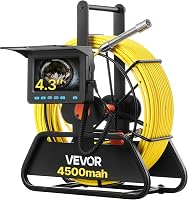
The VEVOR 98 ft Self-Leveling Sewer Camera has a 4.3 in screen, 98 ft cable, and video and photo capture. Its self-leveling feature is intended to keep images upright as the probe rotates.
For a longer reach, the VEVOR 164 ft Sewer Camera has a 164 ft cable, a 4.3 in screen, and photo and video capture. It does not have a built-in locator transmitter.
What should you do if the camera shows roots?
Save the footage and ask a plumber to review the finding before choosing a repair. The camera can show an interior condition, but it doesn't tell you how far roots extend outside the pipe or which repair fits.
Write down the access point, the distance reading, and what appears on screen. Share the video or photos if available, and ask whether the pipe needs a closer inspection or repair.
If the camera view is blocked, the line is hard to reach, or you cannot identify what you see, stop and get professional help. A plumber can assess the line and explain suitable next steps.
Can a sewer camera see tree roots outside the pipe?
No, a sewer camera only shows the inside of the pipe in front of its lens. It cannot show roots in the surrounding soil or confirm how far they extend beyond the pipe wall.
A locator may help estimate the underground position of a compatible camera head. That position can guide a follow-up check, but it does not make the camera an underground viewing tool.
How can you tell whether a root problem needs professional help?
Get a plumber's assessment if roots block the view, water cannot pass, or the camera shows damage near the growth. A recording can help explain what you saw, but repair decisions depend on the pipe and the cause of the intrusion.
A camera view can help you ask more specific questions: where the suspected roots appeared, whether the wall or joint was visible, and what the next inspection step should be. Keep the video and notes together for that discussion.
If you are deciding whether to rent or buy equipment for a one-time inspection, read should you rent a sewer camera or buy one. For a home purchase, see whether a sewer scope inspection is worth it before you buy.
Can a sewer camera see tree roots well enough to act?
For seeing tree roots with a sewer camera, use the footage to identify and document a possible intrusion, then have a plumber assess what it means for the line. Choose a camera with recording for review, and consider a compatible locator if you need an underground position estimate.
If the camera shows a possible root mass but not the pipe wall or entry point, treat that as a reason to get a clearer assessment. A saved video, distance note, and access-point description give the plumber useful context.
Frequently asked questions
Can a sewer camera show tree roots in a pipe?
Yes. A sewer camera can show roots that have reached the inside of a drain line, including fine strands, thicker growth, or a mass that blocks part of the view.
The camera only shows what its lens can see, so dirt, water, grease, and pipe bends may hide some of the line or the extent of damage.
What do roots look like on a sewer camera?
Roots may look like pale or brown strands, branching fibers, or a dense clump extending through a joint or crack. The color and shape can vary with the pipe, lighting, water, and debris.
A single image may be unclear, so compare the view as the camera moves and record the area for review.
Can a sewer camera find where roots are outside the pipe?
A camera can show where the head is inside the pipe, but it does not mark the spot above ground by itself. A compatible locator can detect a transmitter in the camera head and help estimate its underground position.
Check that the camera has a transmitter and the locator can detect its signal.
Should I remove tree roots from a sewer line myself?
A camera can help you see a blockage, but it does not tell you which repair method is safe for the pipe. Roots may enter through a joint or damaged section, and cutting them without addressing the entry point can leave the cause in place.
Ask a licensed plumber to assess the line and repair options.