7 Best Inspection Cameras for Plumbing Work (October 2026)
The best inspection cameras for plumbing work include the Teslong NTS500 5-Inch Dual-Lens Inspection Camera for wall cavities, the Ridgid Micro CA-150 Inspection Camera for still-image records, and the Milwaukee M12 M-Spector 360 Inspection Camera for drain bends.
On this page (6 sections)
The best inspection camera for plumbing is the one that reaches the problem area and fits the route. The Teslong NTS500 gives you front and side views on a 9.8 ft probe, while the Klein ET18 has an armored 4.9 ft gooseneck; for longer sewer runs, look at a reel-based system.
Handheld inspection cameras are useful for nearby traps, fixture openings and wall cavities. They aren't a substitute for a drain camera with a long push cable, so choose based on access, distance and bends.
For a longer run, compare drain cameras by cable, head and screen. If you need to inspect a sewer line beyond nearby plumbing, start with the sewer camera buying guide.
Our picks at a glance
-
1
 Best for wall cavities
Teslong NTS500 5-Inch Dual-Lens Inspection Camera
8.4/10 our score
See it on Amazon -
2
 Best for still-image records
Ridgid Micro CA-150 Inspection Camera
8.0/10 our score
See it on Amazon -
3
 Best for drain bends
Milwaukee M12 M-Spector 360 Inspection Camera
7.8/10 our score
See it on Amazon
- 4
 Check it
Klein Tools ET18 Plumbing Borescope
Best for narrow openings - 5
 Check it
Ridgid Micro CA-350 Inspection Camera
Best for reel-system use - 6
 Check it
Ridgid Micro CA-25 Inspection Camera
Best for simple fixture checks - 7
 Check it
Bosch GIC4-23C Connected Inspection Camera
Best for computer image transfer
How we chose the best inspection camera for plumbing
We compared each camera's reach, viewing options, screen, lighting and ability to save images or video. We also considered whether it is described for plumbing or drain work and whether longer reach requires a separate reel.
The scores reflect how each tool's features fit common inspection jobs. A long handheld probe, a small camera head and a reel-compatible system solve different access problems, so the highest-ranked pick isn't automatically right for every drain.
Which plumbing inspection camera fits each job?
Choose by the inspection route first, then consider the view and the record you need. These picks cover close-range checks, image capture and the option to use a separate reel system.
| Product | Best for | Probe | Screen | View | Our score |
|---|---|---|---|---|---|
| Teslong NTS500 5-Inch Dual-Lens Inspection Camera | wall cavities | 9.8 ft flexible probe | 5 in, 720p IPS LCD | Front and side-view cameras | 8.4 |
| Ridgid Micro CA-150 Inspection Camera | still-image records | 3.5 in color display | 8.0 | ||
| Milwaukee M12 M-Spector 360 Inspection Camera | drain bends | 4.3 in LCD | 7.8 | ||
| Klein Tools ET18 Plumbing Borescope | narrow openings | 4.9 ft armored gooseneck | 4.3 in color LCD | 7.7 | |
| Ridgid Micro CA-350 Inspection Camera | reel-system use | 7.6 | |||
| Ridgid Micro CA-25 Inspection Camera | simple fixture checks | 2.7 in color LCD | 180-degree image rotation | 7.5 | |
| Bosch GIC4-23C Connected Inspection Camera | computer image transfer | 4 in display | 7.3 |
Teslong NTS500 5-Inch Dual-Lens Inspection Camera: Best for wall cavities
- Front and side-view cameras
- 9.8 ft flexible probe
- 5 in 720p screen
- IP67 waterproof rating
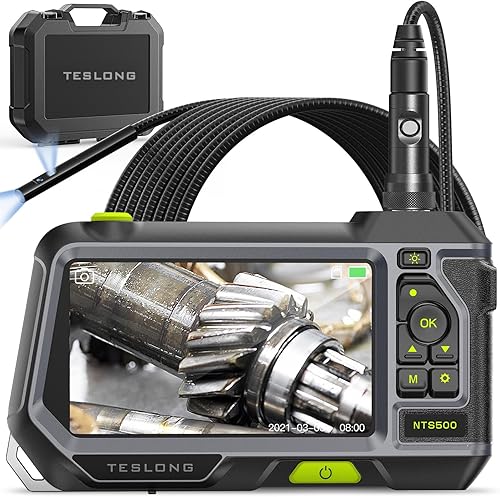
Two cameras at the end of the flexible probe let you switch between front and side views. Its large screen and IP67 rating suit close-range wet-area checks.
Pros
- Two camera views
- Large 5 in screen
- Adjustable LEDs
Cons
- Probe is 9.8 ft long
- Not a long-reach sewer reel
The Teslong NTS500 is the strongest fit when the inspection area is close but you need more than a straight-ahead view. Its flexible probe has front and side-view cameras, and a button switches between them without an extra mirror.
A 5 in screen gives you a larger viewing area than the other handheld picks here. Six adjustable LEDs light the front camera, and the side camera has its own illumination.
Teslong rates the probe IP67 for wet environments and says its connector is water safe for pools, plumbing and rain. Its 9.8 ft probe still isn't a long sewer push cable, so choose another class of camera for a distant lateral.
Choose this model for wall cavities, nearby plumbing and wet-area checks where two viewing angles are useful. Skip it if the job requires traveling far down a drain through multiple bends.
Ridgid Micro CA-150 Inspection Camera: Best for still-image records
- 3 ft cable
- 3.5 in color display
- Stores up to 20 still images
- Four adjustable LEDs
The CA-150 stores up to 20 still images for later viewing on its screen. Its short cable fits nearby plumbing, wall and HVAC checks.
Pros
- Stores still images
- Four adjustable LEDs
- Hook, magnet and mirror included
Cons
- 3 ft cable limits reach
- Stores still images, not video
The RIDGID Micro CA-150 fits short checks where you want to save still images. It stores up to 20 images for later playback on its 3.5 in color display.
Four adjustable LEDs help illuminate dark spaces. A hook, magnet and mirror are included for viewing around a corner or retrieving a small object where it is accessible.
The 3 ft cable is a firm limit on how far it can reach into a drain. Choose it for a nearby pipe, wall or HVAC space; skip it if you need video or a view far down a line.
For longer drain work, see our guide to using a sewer camera on your own line.
Milwaukee M12 M-Spector 360 Inspection Camera: Best for drain bends
- 4 ft cable
- 360-degree image rotation
- Three zoom levels
- Captures images and videos
The M-Spector 360 offers image rotation, zoom and adjustable brightness on its LCD. It captures images and videos to an included SD card.
Pros
- 360-degree image rotation
- Three zoom levels
- Adjustable LED brightness
Cons
- 4 ft cable limits reach
- 10 mm camera head may not fit every opening
The Milwaukee M12 M-Spector 360 suits close inspections where image orientation and detail matter. Its screen can rotate, and three zoom levels let you bring an area closer on the display.
Five brightness modes adjust LED output. The camera captures images and video to the included SD card, which makes it useful when you want to keep a record of a nearby check.
Its 4 ft cable and 10 mm head are best for accessible drain lines and spaces behind walls. Check the opening before buying, and skip it if you need to inspect a long sewer lateral.
Klein Tools ET18 Plumbing Borescope: Best for narrow openings
- 4.9 ft armored gooseneck
- 5.5 mm IP67 camera
- 4.3 in LCD
- Captures images and video
The ET18 pairs a 5.5 mm waterproof camera with an armored gooseneck. It captures images and video and includes a mirror, hook and magnet.
Pros
- Armored probe
- Four brightness levels
- Self-storing monitor kickstand
Cons
- 4.9 ft probe is for close-range checks
- No long sewer reel
The Klein Tools ET18 is the plumbing-focused pick for a close inspection with an armored probe. Its 4.9 ft gooseneck ends in a 5.5 mm IP67 camera, with a 4.3 in screen and four brightness levels.
It captures images and video for later reference. The included mirror, hook and magnet give you options for viewing and retrieving small objects, while the monitor kickstand supports hands-free viewing on a level surface.
Choose it when probe protection and plumbing attachments matter for nearby work. Skip it for a full sewer lateral: the short gooseneck isn't a reel or long push cable.
Ridgid Micro CA-350 Inspection Camera: Best for reel-system use
- Records still images and video
- Rechargeable 12V battery
- Interchangeable camera heads
- Compatible with select SeeSnake reels
The CA-350 records pictures and video, and it can work with select RIDGID SeeSnake reels for longer reach. Those reels are separate systems.
Pros
- Records video and still images
- Rechargeable battery
- Interchangeable camera heads
Cons
- Longer reach requires a compatible reel
- 17 mm imager may not suit narrow openings
The RIDGID Micro CA-350 is the system to consider when you need video and may want to add more reach. It records still images and video, and it works with select micro Reel, Nano Reel and micro Drain systems.
The compatible reels are separate equipment. The included 17 mm imager is larger than the camera heads on several handheld borescopes here, so measure the access opening before choosing it for a narrow pipe.
It comes with a rechargeable 12V battery and a case. Choose the CA-350 if you want a handheld display that can also work with a compatible RIDGID reel; skip it if you only need a basic close-range view.
For a complete reel-based option, compare our best sewer cameras for home use.
Ridgid Micro CA-25 Inspection Camera: Best for simple fixture checks
- Waterproof camera head and cable
- Four adjustable LEDs
- 2.7 in color LCD
- 180-degree image rotation
The CA-25 is a simple option for short-range visual checks, with a waterproof camera head and cable, four LEDs and a color screen.
Pros
- Waterproof camera head and cable
- Four adjustable LEDs
- Hook, magnet and mirror included
Cons
- 2.7 in screen is the smallest here
- Short-range camera
The RIDGID Micro CA-25 covers basic short-range checks where a simple live view is enough. Its waterproof camera head and cable, four adjustable LEDs and 2.7 in color LCD handle nearby visual inspections.
You can rotate the image 180 degrees, and video out sends a live view to another device. The included hook, magnet and mirror can help with accessible small objects or alternate viewing angles.
Choose it for simple checks around fixtures and nearby plumbing. Skip it if you need a large screen, saved video or a camera that can travel far down a drain.
Bosch GIC4-23C Connected Inspection Camera: Best for computer image transfer
- 5 ft cable
- 4 in display
- Stores up to 30 pictures
- Transfers images by USB-C
The Bosch has a 5 ft cable, stores up to 30 pictures and transfers images to a computer over USB-C. Its orientation indicator helps show which end is up.
Pros
- Stores up to 30 pictures
- USB-C image transfer
- Orientation indicator
Cons
- 5 ft cable is for nearby checks
- Manual focus
The Bosch GIC4-23C suits nearby checks when transferring pictures to a computer matters. It stores up to 30 pictures, and the included USB-C cable transfers them to a computer.
Its orientation indicator shows which end is up, and the 5 ft camera cable reaches into narrow spaces. The camera uses Bosch's 12V Max battery system and has manual focus.
Choose it for local inspections where you want a digital image record. Skip it if you need a long drain cable or prefer the camera to handle focus automatically.
What should you check before buying a plumbing camera?
Check the access opening, distance and route before comparing screens or recording features. A camera can only show what its head can enter and its cable can reach.
Measure the opening against the camera head, then estimate the full route from the access point to the area of concern. Allow for bends and the working room needed to guide the probe, and compare the camera's reach with that distance.
Next, decide what view and record will help you act. A side camera can help when a straight view misses the area; saved images or video can help you share what you see or compare it later.
For a longer system, our pipe inspection camera guide covers cable, camera head and screen choices.
Is a short-probe camera enough for plumbing?
A short-probe camera is enough when the area is nearby and accessible, such as a fixture opening, short pipe section or wall cavity. Its handheld screen and probe are suited to local checks without setting up a reel.
A short probe is the wrong choice if the suspected problem is much farther down a drain. For longer routes, compare a dedicated push-cable camera and see when a sewer camera locator is useful.
Does a waterproof rating make a camera sewer-ready?
A waterproof rating describes protection for the rated camera or probe, but it doesn't mean the full tool is built for every drain condition. Check the stated use, cable design and route before putting a borescope into a wet or dirty line.
For long or buried lines, choose a system made for that type of travel. A handheld camera may show a nearby section, but it cannot replace a purpose-built sewer camera's cable and reel.
What camera head and cable size should you check?
Check the head diameter against the smallest opening on the route, not just the pipe's main diameter. A head that cannot pass the access point or a tight fitting won't reach the area you want to inspect.
Cable length and flexibility also matter. A short flexible probe is useful for close access, while a drain camera's push cable is designed for a different job; our guide to sewer camera cable length helps frame the reach decision.
How do you set up and use an inspection camera?
Set up by checking the route, the camera's condition and the image before inserting the probe. A slow, controlled inspection makes it easier to understand what the camera is showing.
Start with a clear access point and a plan for where the cable should go. Turn on the camera, adjust its light, and check the live view in open space so you know how the image rotates and how brightness affects what you can see.
Feed the probe gently and stop if it catches or resists. Don't force a handheld cable around a sharp turn; withdraw it, change the approach or use a camera system intended for the route.
When you find an area of interest, hold the camera steady and adjust the angle or brightness. Capture an image or video if the camera supports it, then note where the view came from so you can relate it to the pipe or opening.
Afterward, withdraw the probe carefully and clean it according to the tool's instructions. Keep the camera, cable and monitor dry as required by their stated ratings, and store the cable without tight kinks.
What mistakes lead to a poor camera choice?
The most common mistake is buying by screen size or features before checking reach and access. A clear display won't help if the camera head can't fit or the cable can't get to the area.
Another mistake is treating all waterproof cameras as drain cameras. Ratings and intended use differ, and a handheld probe may not be designed to travel through a long, dirty pipe.
Don't assume still-image storage and video recording are interchangeable. If you need to show movement or share a walkthrough, choose a camera that records video; if a few reference images are enough, still capture may suffice.
Finally, don't overestimate what a camera can diagnose. It shows the view in front of the lens, while bends, residue, water and camera position can hide other parts of the line.
Which inspection camera for plumbing should you choose?
Choose the Teslong NTS500 for close wet-area checks where a long handheld probe and front-and-side views are useful. Pick the Klein ET18 when you want a narrow camera head, armored gooseneck and plumbing attachments.
Choose the RIDGID CA-350 if recording and compatibility with a separate reel system fit your work. For a simple nearby check, consider the CA-150 for still images or the CA-25 for a basic live view; for long drains, start with a dedicated plumbing snake camera.
Our top 3 picks at a glance
-
1
Best for wall cavities
Teslong NTS500 5-Inch Dual-Lens Inspection Camera
8.4/10 our score
See it on Amazon -
2
Best for still-image records
Ridgid Micro CA-150 Inspection Camera
8.0/10 our score
See it on Amazon -
3
Best for drain bends
Milwaukee M12 M-Spector 360 Inspection Camera
7.8/10 our score
See it on Amazon
Frequently asked questions
What type of inspection camera works for plumbing?
Choose a handheld borescope for nearby pipes, fixtures and wall cavities. For a longer sewer line, use a drain camera with a push cable built for pipe travel, and check that its camera head and cable suit the pipe size and bends.
A short probe can confirm what is near an access point, but it cannot inspect a whole property line.
Can a borescope go down a drain?
Some borescopes are rated for wet environments, but a water rating alone does not make one suitable for pushing through a drain line. Check the camera and probe rating, cable design and how the tool handles bends and water.
For a line inspection, a dedicated drain camera is usually the better match.
How long should a plumbing inspection camera cable be?
Match cable length to the distance from the access point to the area you need to see. Handheld probes of a few feet fit local checks, while a sewer lateral may need a much longer push cable.
Allow extra reach for bends and setup, and see our guide to choosing sewer camera cable length.
Can an inspection camera find a clog?
A camera can show visible material or damage inside the section it reaches, which may help you locate a blockage. It does not remove the clog, and a short probe may not reach far enough to show its full extent.
Clear the line as needed, then inspect again if you need to check the result.
Do plumbing inspection cameras record video?
Some do, and others store only still images. The Milwaukee M12 M-Spector 360, Klein ET18 and RIDGID CA-350 can capture video, while the CA-150 stores still images for playback.
Decide whether you need to share a moving record before choosing, since a live view alone may not leave anything to send.