How to Choose a Pipe Inspection Camera
Choose a pipe inspection camera to fit the pipe, route and inspection distance. For drains, compare cable length, camera head clearance, lighting, screen and whether you need to locate a spot from above ground.
On this page (8 sections)
- What kind of pipe inspection camera fits your job?
- How much cable length do you need?
- What camera head and lighting features matter?
- Do you need a locator, recording or a built-in screen?
- Which pipe inspection camera suits each use?
- How should you compare pipe inspection camera screens?
- What should you check before buying?
- Which pipe inspection camera should you choose?
A pipe inspection camera should match the pipe route, distance and job. For a buried drain, prioritize cable reach, head clearance, lighting and a locator if you need to mark the camera's position; for short plumbing checks, a handheld scope may be enough.
Start by identifying the pipe diameter, likely bends and the point you need to inspect. Then compare cable length, camera head features, screen and recording needs.
If your work is focused on household drains, our drain camera guide explains how cable, head and screen choices affect the fit. For broader sewer-line use, see the plain sewer camera buying guide.
What kind of pipe inspection camera fits your job?
Choose a long-cable drain camera for pipes, and a short handheld inspection camera for nearby spaces. The cable and camera head need to suit the pipe's diameter and bends, not just the distance printed in the name.
The Ridgid Micro CA-150 has a 3 ft cable, a 3.5 in color display and 4 adjustable LEDs. It's intended for close visual checks in places such as behind walls and HVAC areas, rather than long drain runs.
For a drain or sewer line, a push camera gives you a longer reach. Tight elbows, traps, pipe diameter and buildup can affect how far the camera head travels.
Pick the tool based on the route. Our best inspection cameras for plumbing work compares tools aimed at plumbing tasks, while the best plumbing snake cameras page focuses on long-cable drain inspection.
How much cable length do you need?
Choose a cable that reaches the inspection area from your access point, with enough extra length to handle the reel and entry point. A long cable is useful only if its stiffness and the pipe route allow the camera head to advance.
A 50 ft cable can suit shorter drain inspections. Longer 164 ft and 165 ft systems can reach farther.
Before choosing, estimate the distance from the cleanout or other entry point to the target area. For more help estimating reach, see how long a sewer camera cable should be.
Will the cable pass the bends in your pipe?
A cable's stated length doesn't tell you how well it will pass bends. Check pipe diameter and bend limits, and account for traps or tight turns that may stop a semi-rigid cable.
The Teslong 50 ft camera is described for straight PVC drains and has limited flexibility through tight 90-degree elbows and P-traps. VEVOR says its 164 ft model can pass two consecutive bends, with a single 90-degree elbow suited to pipe diameters from 50 to 100 mm.
VEVOR gives a similar bend note for its 165 ft camera, with a single 90-degree elbow suited to 50 to 150 mm pipe. Compare these ranges with your actual pipe route before choosing.
If a line has tight turns, don't assume a longer cable will solve the problem. A short camera may be easier to guide in accessible plumbing, while a drain camera needs a route its cable can manage.
What camera head and lighting features matter?
Choose a camera head that can enter the pipe and lighting that helps you see the area in front of it. A head that's too large for the pipe opening can't reach the inspection point, regardless of screen size or cable length.
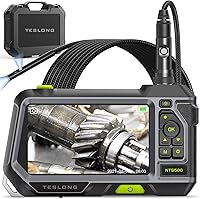
VEVOR gives compatible straight-pipe ranges of 25 to 150 mm for its 165 ft system and 30 to 100 mm for its 164 ft camera. The Teslong 50 ft system has forward and side cameras, so it can show the pipe ahead and the walls at once.
The Teslong has 6 LEDs on the forward camera and 1 LED on the side camera. Murky water can reduce visibility, so Teslong recommends flushing with clean water before inspection.
Check both the camera head and the pipe opening before buying. If you need the camera to stay upright as it turns, compare self-leveling and standard sewer cameras.
Do you need a locator, recording or a built-in screen?
Choose a locator when you need to find the camera head's position from above ground. Choose recording when you need to save images or video, and a built-in screen when you want to view the feed without relying on a phone.
The VEVOR 165 ft system includes a 512 Hz transmitter and locator receiver, plus recording and photo functions. VEVOR's 164 ft camera supports video and photo capture and includes a 16 GB SD card, but it doesn't include a locator.
The Teslong has a built-in 4.3 in IPS display and dual-camera split screen. It doesn't require a phone or Wi-Fi, and its TF memory card is sold separately.
Treat seeing, saving and locating as three separate needs. A clear screen shows the live view, recording saves what you see, and a compatible locator helps you find the head's position above ground.
Read what a sewer camera locator does if you're deciding whether that function matters.
Which pipe inspection camera suits each use?
Choose a camera based on the job's reach and the information you need from the inspection. These four options cover close-range checks, shorter drain work and longer pipe runs.
Ridgid Micro CA-150: nearby visual checks
The Ridgid Micro CA-150 fits short inspections behind walls, in HVAC areas or around a vehicle. Its 3 ft cable and handheld 3.5 in display make it a different kind of tool from a long sewer camera.
It can store up to 20 still images for on-screen playback. It includes 4 AA batteries.
Choose it for close access and saved still images. For a sewer line that runs far beyond the entry point, compare long-cable cameras instead.
Teslong 50 ft Dual-Lens Drain Camera: shorter drain inspections
The Teslong suits shorter drain checks where seeing both ahead and along the pipe wall is useful. Its 50 ft semi-rigid cable is intended for straight PVC drains, and the 4.3 in screen shows the forward and side camera views together.
Its cable has limited flexibility through tight elbows and P-traps, so check the route first. A TF memory card is sold separately if you need to save inspection files.
Choose it when dual views help you inspect a shorter, mostly straight drain. Consider a longer cable for a distant target, but don't treat extra length as a fix for a tight bend.
VEVOR 164 ft Sewer Camera: longer reach without a locator
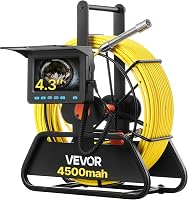
The VEVOR 164 ft camera suits buyers who need extended cable reach and a built-in display. It has a 4.3 in screen, 6 adjustable LEDs, distance markings, and photo and video capture with a 16 GB SD card.
The camera head doesn't have a built-in 512 Hz transmitter, and the system doesn't include a locator receiver. VEVOR describes a 50 to 100 mm pipe range for a single 90-degree elbow.
Choose it if cable reach and saved inspection footage matter more than locating the camera from above. Confirm that the pipe dimensions and bends suit the cable.
VEVOR 165 ft Sewer Camera With Locator: long reach and position finding
The VEVOR 165 ft system suits inspections where you want long cable reach and a locator to help find the camera head. It includes a 9 in screen, adjustable LEDs, photo and video recording, a 16 GB SD card and a 512 Hz locator system.
VEVOR gives a straight-pipe range of 25 to 150 mm, with a 50 to 150 mm range for a single 90-degree elbow. The system doesn't support self-leveling, so the picture may not stay upright as the camera turns.
Choose it if you need the locator and a longer cable. If the camera head's position is already easy to access, a system without a locator may fit your needs.
How should you compare pipe inspection camera screens?
Choose a screen you can read in the place where you'll use the camera. A larger display can make live viewing easier, but it doesn't tell you whether the camera head fits the pipe or the cable can pass a bend.
The options here range from the Ridgid's 3.5 in display to the 4.3 in Teslong and VEVOR 164 ft screens, and the 9 in screen on the VEVOR 165 ft system. The Teslong display tilts and rotates 180 degrees, while the VEVOR 165 ft screen is a 720p LCD.
Check whether you need to capture evidence for a repair estimate or simply see a blockage as you inspect. Photos and video can help preserve what appeared on screen, but they don't replace a qualified assessment when the condition or repair is unclear.
What should you check before buying?
Confirm the access point, pipe opening and route before choosing a pipe camera. Measure the likely inspection distance and note bends, then compare those details with the camera's cable and head guidance.
Use this checklist:
- Measure the distance from the entry point to the area you need to see.
- Identify pipe diameter, elbows, traps and other tight turns.
- Check the camera head size and compatible pipe range.
- Decide whether you need a locator, saved images or video.
- Compare screen size and viewing angle for your work position.
- Check battery and storage details if the inspection may take a while.
For do-it-yourself sewer inspections, read how to use a sewer camera on your own drain line before starting. It covers practical steps for getting a view of the line.
Which pipe inspection camera should you choose?
Choose the Ridgid Micro CA-150 for nearby visual checks, the Teslong for shorter drain work with dual views, or a VEVOR long-cable system when you need more reach. Pick the VEVOR 165 ft model when the included locator is useful; choose the 164 ft option if you need long reach and recording but not a locator.
For more models and use cases, browse our best sewer cameras for home use guide. Match the camera to the route you can inspect, then verify the pipe size and bends before you begin.
Frequently asked questions
What should I look for in a pipe inspection camera?
Match the cable length and stiffness to the pipe route, then check camera head size, lighting, screen and recording options. If you need to find a buried problem from above ground, choose a camera system with a compatible locator.
Check the pipe diameter and bends against the camera's guidance.
How long should a pipe inspection camera cable be?
Choose a cable long enough to reach the section you need to inspect, with extra length for setup and handling. A 50 ft cable can fit shorter drain work, while 164 or 165 ft options reach farther.
Cable length alone doesn't guarantee the cable can pass each bend.
Do I need a locator with a pipe camera?
A locator helps you find the camera head's position from above ground when the system includes a compatible transmitter and receiver. It can help mark a buried section for follow-up work.
If you only need to view a short accessible drain, a locator may add little value.
Is a handheld borescope the same as a drain camera?
No. A handheld borescope usually has a short probe for nearby cavities, equipment or spaces behind walls.
A drain camera uses a longer cable and a camera head suited to pipe inspection.
Match the tool to the distance and route, since a short probe can't inspect a long sewer line.