How to Choose a Drain Camera: Cable, Head and Screen
Choose a drain camera by matching its cable to the pipe route, its head to the pipe opening, and its screen to how you’ll review the image. Check the bends, lighting, focus and recording needs before you buy.
On this page (9 sections)
- How long should a drain camera cable be?
- What cable stiffness and diameter work for drain pipes?
- What camera head size and view should you check?
- What screen and recording features are useful?
- Do you need a locator with your drain camera?
- Which drain camera suits each kind of job?
- How should you set up and care for a drain camera?
- What common drain camera mistakes should you avoid?
- How do you make the final drain camera choice?
A drain camera is easiest to choose when you match cable reach and stiffness to the pipe route, head size to the opening, and screen features to the way you’ll review the image. A long cable alone doesn’t ensure that the camera will pass the bends or show the detail you need.
Start at the access point and map the route: pipe size, distance, bends and the area you need to see. Then compare cable handling, camera head, lighting, focus, display and recording options.
If you’re deciding between a compact drain tool and a sewer inspection system, our plain sewer camera buying guide explains the broader choice. For household drain options, see our guide to plumbing snake cameras.
How long should a drain camera cable be?
Choose a cable long enough to reach the inspection area from the access point, with allowance for the route inside the pipe. Cable markings help you track insertion depth, but the number on the reel doesn’t tell you how far the head can travel through your particular line.
Measure or estimate the route before shopping. Include the distance from the opening to the pipe run, then follow the pipe rather than measuring a straight line across a room or yard.
| Route you need to inspect | What to consider |
|---|---|
| A short branch or nearby drain section | A shorter cable may be easier to store and handle |
| A longer indoor or outdoor run | Allow enough cable for the route from the access point |
| An uncertain or extended route | Consider extra reach, then check stiffness and handling |
| Several access points | Estimate the needed reach from each opening |
More cable can mean more to feed, retrieve and manage. Compare length with cable diameter and stiffness, since those traits affect how the camera moves through the pipe.
Length marks tell you how much cable has gone in. They don’t pinpoint the head above ground; that requires a compatible locating transmitter and receiver.
See what a sewer camera locator does if you need to mark a buried problem’s surface position.
What cable stiffness and diameter work for drain pipes?
Choose a cable that fits the route and gives you enough control to advance the camera. A cable that is very flexible can be hard to push, while a thicker or stiffer cable may be difficult to use in tighter sections.
Check the cable diameter and any stated guidance for pipe size or bends. Fittings, standing water and buildup can affect movement, so don’t assume a cable will pass every turn just because it has enough length.
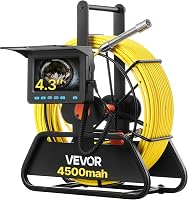
Semi-rigid cables are common for pipe inspection. The DEPSTECH 50 ft camera has a semi-rigid cable, while the VEVOR 98 ft model uses fiberglass and gives guidance for straight and right-angle pipes.
Before choosing, ask:
- What is the narrowest pipe section?
- How many bends are on the route?
- Does the camera’s guidance cover those pipe sizes and bends?
- Can you feed and retrieve the cable safely from the access point?
If you’re comparing complete systems, how to choose a pipe inspection camera covers more of the trade-offs.
What camera head size and view should you check?
Choose a head that fits through the narrowest opening and gives a useful view of the pipe. Head diameter, viewing angle, lighting and focus all affect what you can see.
Compare the head diameter with the opening and any bends along the route. A smaller head can fit into narrower access points, but size alone doesn’t tell you how wide or clear its view will be.
Check the viewing angle and lights next. A wider view can show more of the surrounding pipe wall, while adjustable LEDs let you change the light for dark sections.
Focus range also matters. A close-focus camera may need to move near the area you want to inspect, so advance it in controlled steps instead of expecting a distant view to stay crisp.
The Sanyipace 66 ft camera has an 18 mm head, 8 LEDs, a 145° viewing angle and a close-focus range of 3–4 in. Its close-focus design suits inspections where you want to examine a nearby area.
The VEVOR’s 6 adjustable LEDs have 3 brightness levels. Its stated pipe guidance includes straight pipes from 30 to 100 mm and right-angle pipes from 50 to 100 mm, making it a practical choice when those dimensions fit your route.
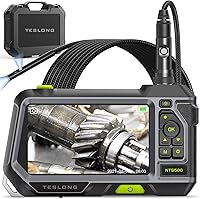
The DEPSTECH’s triple-lens system switches between front and side views. That flexibility suits inspections where one forward angle may not show enough, but a 50 ft cable is a better match for shorter routes than for a long sewer run.
For more formats and use cases, compare the options in our plumbing inspection camera guide.
What screen and recording features are useful?
Choose a display you can see and operate from where you’ll guide the cable. Screen size, image detail, brightness controls and recording options matter when you need to review or share what the camera captures.
A 5 in screen may be easier to view than a 4.3 in screen, but a larger display can add bulk. Consider how you’ll hold or position the unit and whether you need photos, video, audio or removable storage.
The DEPSTECH combines a 5 in IPS screen with photo and video capture, a 32GB memory card and up to 4 hours of use per charge. Its front and side views are useful when you want to change the camera angle without relying on one forward view.
The VEVOR has a 4.3 in color screen, photo and video capture, and a 16GB SD card. It suits buyers who want a compact display and saved images without stepping up to a 5 in screen.
Recording lets you revisit an inspection after the cable is out of the pipe. Keep track of how far the camera traveled as you record, especially if you’ll need to connect an image to a specific section of the route.
Do you need a locator with your drain camera?
You need a locator when you want to find the camera head’s position from above ground. A screen shows the pipe interior; it doesn’t automatically mark the head’s surface location.
Check whether the system has a locating transmitter and whether a compatible receiver is included or sold separately. Cable markings and saved video can help document the inspection, but they don’t pinpoint a buried defect.
The VEVOR 98 ft camera has no built-in 512 Hz transmitter and no 512 Hz receiver. If locating a problem matters, read our comparison of sewer cameras with or without a locator.
Which drain camera suits each kind of job?
Choose the camera around the work you expect to do most often. A short, tight route calls for different priorities than a long run where you need recorded footage or a surface location.
Which drain camera works for a short inspection?
For a nearby drain, prioritize a manageable cable, a head that fits the opening and a screen you can see clearly. A long cable adds storage and handling if your inspections stay close to the access point.
The DEPSTECH’s 50 ft cable and 5 in screen suit shorter inspections where front and side views are useful. Choose another format if the pipe route is longer than that cable can cover.
Which drain camera suits a longer pipe run?
For a longer route, estimate the distance and compare it with cable length, markings, stiffness and pipe-size guidance. Extra reach helps only when the camera head and cable can also work through the route.
The VEVOR’s 98 ft cable and marked fiberglass cable suit buyers who need more reach than a short drain tool provides. Its stated pipe guidance is a useful fit check, and it has no locating equipment.
The JQKJCAM 200 ft camera is aimed at much longer routes. Its 17 mm head, 4.3 in screen, cable markings and video recording suit buyers who value reach and documentation, and its maker describes use in pipes 1 in or larger.
Skip the JQKJCAM if your work is limited to a nearby branch, if you need a built-in locator, or if you can’t manage a long cable from the access point. Its stated battery life is about 6 hours, but extra reach still needs a route that fits the head and cable.
For a walkthrough of setup and cable handling, read how to use a sewer camera on your own drain line.
Which camera helps when you need to save and share findings?
Choose a camera with photo or video capture and storage if you expect to review the inspection later or share it with someone else. Audio can be useful when you want a spoken note to accompany footage.
The Sanyipace records synchronized HD video and audio and has a 5 in IPS display. Its close-focus design suits inspections centered on examining details near the camera, while its 66 ft cable is for routes within that reach.
The DEPSTECH is a strong fit if front and side views matter more than a longer cable. Skip either model if your main need is pinpointing a buried location; screen and recording features don’t replace a locator.
Which features should a first-time owner prioritize?
For a first camera, favor a clear screen, depth markings, manageable cable length and straightforward recording controls. Choose a route and pipe size you can confirm before feeding the head, rather than buying extra reach without knowing whether the head will pass.
The VEVOR suits a buyer whose pipes match its stated size guidance and who wants a marked 98 ft cable, adjustable lights and photo or video capture. Skip it if you need a transmitter and receiver or a self-leveling image; this model has neither.
How should you set up and care for a drain camera?
Set up the camera on a stable surface near the access point, check the charge and storage, and confirm the route before feeding cable. A few minutes of preparation can prevent lost footage, cable tangles and avoidable strain on the head.
Before starting, identify the opening, the pipe direction, the approximate distance and the bends. Check that the head and cable guidance fit the pipe, then arrange the screen so you can see it without pulling the cable at an awkward angle.
If you plan to save footage, confirm that the memory card is in place and that recording controls are ready before the head enters the pipe. Note the starting point and use the cable markings to keep a rough record of insertion depth.
Feed the cable gradually and stop if it binds. Forcing it can make the camera harder to control and may put stress on the cable or head; withdraw a short distance and reassess the direction instead.
After the inspection, retrieve the cable steadily and follow the care steps in the camera’s manual. Clean and dry equipment as directed, inspect the cable and head for visible damage, and wind the cable onto its reel without sharp kinks.
What common drain camera mistakes should you avoid?
The most common buying and use mistakes are choosing by cable length alone, ignoring head size, and expecting a recording to locate a defect underground. Check each of those against your route and inspection goal before you buy.
- Buying more cable than the route needs: A long cable takes more space and effort to manage. Estimate the route from the actual access point first.
- Ignoring pipe size and bends: A head that fits the opening may still struggle farther in. Compare stated pipe guidance with the narrowest section and each bend.
- Assuming a wide view replaces close focus: Viewing angle describes how much area is visible, while focus affects how clearly nearby details appear.
- Mistaking cable marks for location data: Depth marks show how much cable has gone in. They don’t tell you the head’s position above ground.
- Starting without checking storage or charge: Confirm the memory card, recording controls and battery before the camera enters the pipe.
- Forcing a stuck cable: Stop and reassess when movement becomes difficult. Don’t treat extra pushing as a substitute for checking the route or instructions.
How do you make the final drain camera choice?
The best drain camera is the one that fits your access point, route and reason for inspecting. Choose for your most common job, then make sure the head, cable and viewing setup all fit the pipe.
Choose the DEPSTECH 50 ft if your route is shorter and you want a 5 in screen with front and side views. Choose the Sanyipace 66 ft for close-focus viewing and synchronized video and audio recording.
Choose the VEVOR 98 ft if its pipe-size guidance fits your route and you want adjustable lighting with a longer marked cable. Choose the JQKJCAM 200 ft when a much longer reach and video recording are priorities, and skip it for short jobs or when you need a locator.
Before buying, confirm the route length, narrowest pipe section, bends and need for above-ground locating. For more drain-focused choices, see our plumbing snake camera guide.
Frequently asked questions
How long should a drain camera cable be?
Choose a cable that reaches the section you need to inspect, with extra length for the route from the access point. A 50 ft cable can suit a shorter run, while 98 ft or 200 ft options reach farther.
Measure along the pipe, including bends, rather than estimating the straight-line distance.
Cable markings help track how far the head has gone.
What camera head size do I need for a drain?
Match the head diameter to the narrowest opening and pipe section on the route. A smaller head may fit more easily, but you should also compare its light, viewing angle and focus.
Check the camera’s stated pipe-size range and any bend guidance before use.
A head that fits the opening still needs enough room to turn through the route.
Is a larger screen better on a drain camera?
A larger screen can be easier to view while you guide the cable, but it may add bulk to the unit. Compare screen size, image clarity, brightness controls and whether you can record photos or video.
Choose for the place where you’ll work and how you’ll review the inspection afterward.
A 5 in screen is larger than the 4.3 in screens on the VEVOR and JQKJCAM models here.
Do all drain cameras have a locator?
No. A screen shows what the camera sees, but it doesn’t automatically show where the head is underground.
If you need to mark a problem’s surface location, check for a compatible transmitter in the head and a separate locator receiver.
The VEVOR 98 ft model has neither.