Ridgid SeeSnake Alternatives for Home Use
The best Ridgid SeeSnake alternative depends on reach: choose a handheld camera for nearby spaces and a sewer camera for drain lines. For underground locating, choose a system with a transmitter and receiver.
On this page (9 sections)
- Which Ridgid SeeSnake alternative fits your inspection?
- When is a Ridgid handheld camera enough?
- What does the Ridgid Micro CA-350 add?
- When should you choose a sewer camera?
- Does a locator make a sewer camera more useful at home?
- How should you set up and use a home sewer camera?
- What mistakes should you avoid when choosing an alternative?
- Which Ridgid SeeSnake alternative should you choose?
- Related guides
A Ridgid SeeSnake alternative for home use should match the work: a handheld camera for nearby spaces, or a sewer camera for a longer drain run. Add a locator when you need to find the camera head underground.
The Micro CA-150 is suited to close-up checks behind walls, in HVAC areas, or under a vehicle hood. For a drain line, compare the cable reach, pipe size, recording options, and storage needs before choosing a sewer camera.
Which Ridgid SeeSnake alternative fits your inspection?
Start with the distance from the access point to the area you need to see. A 3 ft handheld cable suits nearby spaces; the VEVOR options have 98 ft and 165 ft cables for longer pipe inspections.
The Ridgid Micro CA-150 displays images on a 3.5 in color screen and stores up to 20 still images. The Micro CA-350 records photos and video, and it can work with compatible SeeSnake reels sold separately.
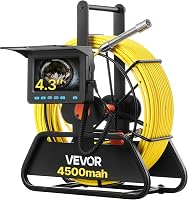
For drain lines, the VEVOR 98 ft camera has a 4.3 in screen. The 165 ft model adds a locator system and a 9 in screen, but its larger reel needs more storage space.
Our sewer camera buying guide explains how cable, camera head, and screen fit together.
When is a Ridgid handheld camera enough?
A handheld camera is enough when the target is close and you can guide its short cable into the opening. It suits nearby hidden spaces, not a long sewer line.
The CA-150 includes a 3 ft cable, mirror, hook, magnet, and 4 AA batteries. Its camera head has four adjustable LEDs, and the display can play back saved still images.
Choose the CA-150 if your main need is a simple view of a nearby area and still-image playback. Skip it if you need to inspect far down a drain or save video.
If you need video or expect to connect compatible SeeSnake reels, consider the CA-350. It is still a handheld inspection camera on its own, so the compatible reel systems are an additional part of the setup.
What does the Ridgid Micro CA-350 add?
The CA-350 adds photo and video recording, a rechargeable 12V battery, and compatibility with specified SeeSnake reel systems. It suits people who need to document inspections or already plan to use a compatible reel.
It works with the micro Reel, micro Drain, and Nano Reel systems, which are sold separately. The camera also has interchangeable heads and a 3 1/2 in color display.
Pick this model when you want to record video or use compatible equipment. Skip it if you need a complete long-reach sewer camera in one setup, since the CA-350 by itself has a 3 ft cable.
For a camera that comes with a long cable, compare the VEVOR 98 ft sewer camera. If the ability to pinpoint a probe matters, read what a sewer camera locator does.
When should you choose a sewer camera?
Choose a sewer camera when you need to view farther into a drain line. Its long cable reaches beyond a handheld camera, though you should check that the pipe and bends suit the model.
The VEVOR 98 ft Sewer Camera records photos and video to a 16GB SD card. It has six adjustable LEDs, a 4.3 in screen, and a cable with distance markings.
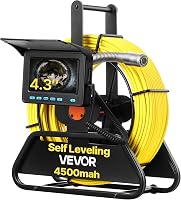
This model has no built-in 512 Hz transmitter or locator receiver, and it does not support self-leveling. The picture may turn as the camera head rotates, so be ready to interpret the view based on the pipe and the camera's movement.
VEVOR specifies this camera for straight pipes 30–100 mm wide and right-angle pipes 50–100 mm wide. Check access, pipe width, and bends before buying; extra cable won't help if the camera head can't pass through the route.
Use our guide to choosing a sewer camera cable length to estimate the reach you need. Keep the cable under control as you feed it, and avoid forcing it around a tight turn.
Does a locator make a sewer camera more useful at home?
A locator is useful when you need to find the camera head's position underground. It helps connect what you see on the screen with a spot above the buried line.
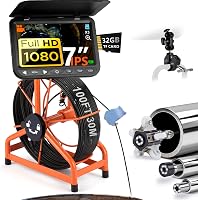
The VEVOR 165 ft Sewer Camera With Locator has a 512 Hz transmitter in its camera head and includes a locator receiver. It records photos and video, and its cable has distance markings.
Choose this system if you need the longer reach and expect to use the locator. Skip it for occasional nearby checks or when you don't need to pinpoint the camera; the larger reel takes more room than a handheld camera.
The 165 ft model is specified for straight pipes 25–150 mm wide and right-angle pipes 50–150 mm wide. It does not support self-leveling, so the view can rotate as the camera head turns.
Compare sewer cameras with or without a locator if you're unsure that locating is worth including. For a one-time inspection, consider renting or buying a sewer camera.
How should you set up and use a home sewer camera?
Prepare the route and recording plan before feeding the camera into a line. This makes it easier to control the cable and understand what you see.
First, identify the cleanout or other access point and estimate the distance to the area you want to inspect. Check pipe diameter and bends against the camera's stated range, then set the reel on stable ground and keep the screen where you can see it.
Start the camera and confirm the image and lights before feeding the cable. Advance it gradually, using the distance marks as a guide, and pause when the view changes so you can save a useful photo or video.
Don't force the cable when it meets resistance. Pulling it back a short distance and changing the angle may help, but a camera that's repeatedly stuck or difficult to retrieve is a reason to stop and get professional help.
After the inspection, retrieve the cable steadily and clean it according to the manufacturer's care instructions. Protect the camera head and lens, let equipment dry as directed, and charge or replace the power source before storing it.
For a fuller walkthrough, see how to use a sewer camera on your own drain line. If you're not sure the line is accessible or safe to inspect, a drain professional can assess it.
What mistakes should you avoid when choosing an alternative?
The most common buying mistakes are choosing by cable length alone, overlooking a locator requirement, and assuming a handheld camera can inspect a sewer run. Each can leave you with equipment that doesn't fit the job.
- Don't buy the longest cable without checking pipe diameter and bends.
- Don't assume every sewer camera includes a locator; the 98 ft VEVOR model does not.
- Don't count on a handheld camera to reach far into a drain.
- Don't expect a self-leveling image from either VEVOR model.
- Don't buy the CA-350 expecting a long cable unless you also have a compatible reel system.
Think about transport and storage as well as reach. A reel-based camera is a larger setup, while a handheld camera is easier to keep ready for nearby checks.
For more options, see the best sewer cameras for home use. If you only need a camera for one job, renting may be more practical than storing a full system.
Which Ridgid SeeSnake alternative should you choose?
Choose the CA-150 for nearby visual checks, the CA-350 for recording with compatible reels, the 98 ft VEVOR for longer drain views without locating, or the 165 ft VEVOR when you need reach and a locator. Let the access point, pipe route, and recording needs decide.
A longer cable doesn't make a camera right for every home. Check reach and pipe fit before buying, and get professional help if you can't safely feed or retrieve the equipment.
Start with the sewer camera buying guide for a broader comparison, then use this Ridgid SeeSnake alternative guide to match the setup to your inspection.
Related guides
- Sewer cameras: a plain buying guide for homeowners
- How long should a sewer camera cable be?
- What does a sewer camera locator do?
- Should you rent a sewer camera or buy one?
Frequently asked questions
What is a good Ridgid SeeSnake alternative for home use?
The right choice depends on the inspection distance. The Ridgid Micro CA-150 has a 3 ft cable for nearby spaces, while the VEVOR sewer cameras have 98 ft and 165 ft cables for longer drain lines.
Choose a model with a locator if you need to find the camera head underground.
Can a handheld inspection camera replace a sewer camera?
A handheld camera can suit nearby areas behind walls or inside HVAC spaces, but its short cable won't reach far along a sewer line. The Ridgid Micro CA-150 has a 3 ft cable; the VEVOR sewer cameras here have cables of 98 ft and 165 ft.
Match the camera to the distance and access point.
Do all sewer cameras include a locator?
No. The VEVOR 98 ft Sewer Camera has no built-in 512 Hz transmitter or locator receiver.
The VEVOR 165 ft Sewer Camera With Locator includes a 512 Hz transmitter in its camera head and a receiver, so you can track the probe from above ground.
Should I buy a sewer camera or rent one?
Renting can make sense for a one-time inspection, while buying may suit repeat use or quick access at home. Consider how often you'll use it, the cable length you need, and whether locating matters.
See our guide to renting or buying a sewer camera for help deciding.